










Five easy-to-use open-sourced Python web scraping libraries to help you build your own news mining solution.
In this article, we will be looking at five open-source Python web scraping libraries. In particular, libraries that enable you to mine news data easily. All of these libraries work without any API keys or credentials so you can hit the ground running. Use these to build your own DIY data solution for your next Natural language processing (NLP) project that requires news data.
Each library mentioned in this article is accompanied by code that you can copy and run.
News data is essential for many applications and solutions, especially so in the financial and political domains. And just getting news data is not enough, these use-cases require news data at scale. For instance, an electoral candidate contesting at the national level wouldn't want to assess their ratings based on just the local news publications. Similarly, investment firms wouldn't want to build their whole thesis around a few websites. This is precisely why news data extraction and aggregation services (like our newscatcher) exist.
That being said, we understand that when you're just starting out and want to build an MVP, it's unreasonable to pay for the data or be held accountable to a specific number of API calls. So we created this list of free Python libraries that enable you to get news data at scale without worrying about anything. If, however, these don't satisfy your requirements, you can sign-up for our no-card trial here.
These can work well as fully-fledged news data API alternatives when used on a small scale for a limited use case:
PyGoogleNews
PyGoogleNews, created by the NewsCatcher Team, acts like a Python wrapper for Google News or an unofficial Google News API. It is based on one simple trick: it exploits a lightweight Google News RSS feed.
To install run: pip install pygooglenews
In simple terms, it acts as a wrapper library for the Google RSS feed, which you can easily install using PIP and then import into your code.
What data points can it fetch for you?
- Top stories
- Topic-related news feeds
- Geolocation specific news feed
- An extensive query-based search feed
from pygooglenews import GoogleNews

gn = GoogleNews()
top = gn.top_news()

for entry in top['entries'][:3]:
    print(entry['title'])

# OUTPUT
# U.S.-Iran Updates: Trump says no talks with Iran taking place as standoff over Strait of Hormuz continues - CBS News
# Election Live Updates: Florida, Alaska and Wyoming Hold Key Primaries - The New York Times
# Disney and ABC sue Trump's media regulator to stop early licence renewal - BBC
The code above shows how you can extract certain data points from the top news articles in the Google RSS feed. You can replace the code “gn.top_news()” with “gn.topic_headlines('business')” to get the top headlines related to “Business” or you could have replaced it with “gn.geo_headlines('San Fran')” to get the top news in the San Fransisco region.
You can also use complex queries such as “gn.search('boeing OR airbus')” to find news articles mentioning Boeing or Airbus or “gn.search('boeing -airbus')” to find all news articles that mention Boeing but not Airbus.
When web-scraping news articles with this library, for every news entry that you capture, you get the following data points, that you can use for data processing, or training your machine learning model, or running NLP scripts:
- Title - contains the Headline for the article
- Link - the original link for the article
- Published - the date on which it was published
- Summary - the article summary
- Source - the website on which it was published
- Sub-Articles - list of titles, publishers, and links that are on the same topic
We extracted just a few of the available data points, but you can extract the others as well, based on your requirements. Here’s a small example of the results produced by complex queries.
If you run the code below:
So, we printed the titles of the articles that we got as a result of running the search based on a complex query, and you can see that each article is about Boeing or Airbus. You can use other querying options as explained on the Github page of the library to perform even more complicated queries on the latest news using PyGoogleNews. This is what makes this library very handy and easy to use even for beginners.
NewsCatcher
This one is another open-source library created by our team that can be used in DIY projects. It’s a simple Python web scraping library that can be used for scraping news articles from almost any news website. It also enables you to gather details related to a news website. Let’s elaborate on this with the help of some examples and code.
Before you install it, a note from 2026. The newscatcher package hasn’t had a release since May 2020 and is no longer maintained; on current Python versions its pinned dependencies no longer even install. We’ve kept the examples for reference, but for news data today use a news scraping API, like our News API, instead.
To install run: pip install newscatcher
In case you want to grab the headlines from a news website, you can just create a Newscatcher object passing the website URL (remember to remove the HTTP and the www and just provide the website name and extension), and use the get_headlines() function to obtain the top headlines from the website. If you run the code below:
You will be receiving the top headlines in the output:
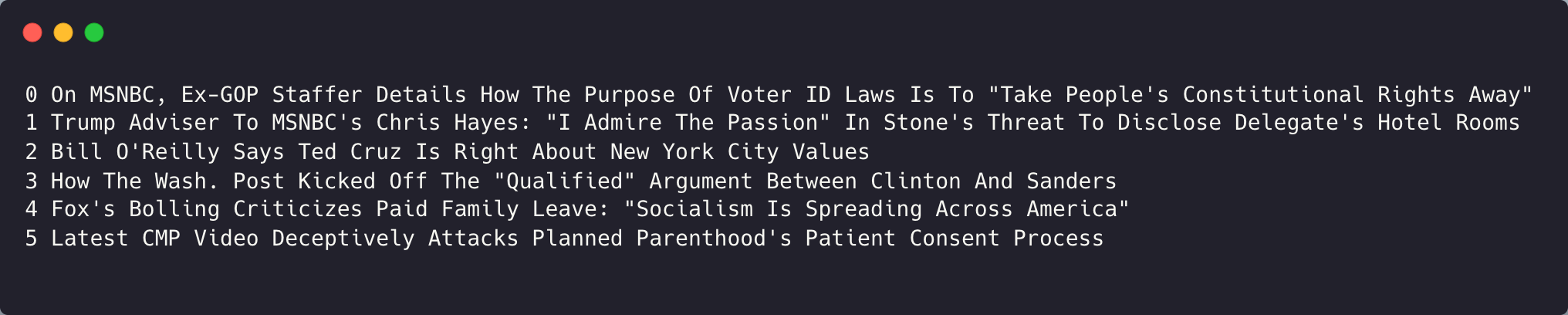
We have truncated the results, but you can run the same in your system, to view all the results. In case you want to view all the data points related to a particular news article, you will have to choose a different route.
from newscatcher import Newscatcher

nc = Newscatcher(website='nytimes.com')
results = nc.get_news()

# results.keys()
# 'url', 'topic', 'language', 'country', 'articles'

articles = results['articles']
In the code above, we used the get_news() function to get the top news from nytimes.com. While extracting just a few of the data points, you can get all of them for further processing:
- Title
- Link
- Authors
- Tags
- Date
- Summary
- Content
- Link for Comments
- Post_id
We ran the code to obtain the JSON shown below. The tags can come in very handy in case you want to sort through hundreds of news articles or store them in cloud storage in a format such that they can be used later on in your NLP or ML projects.
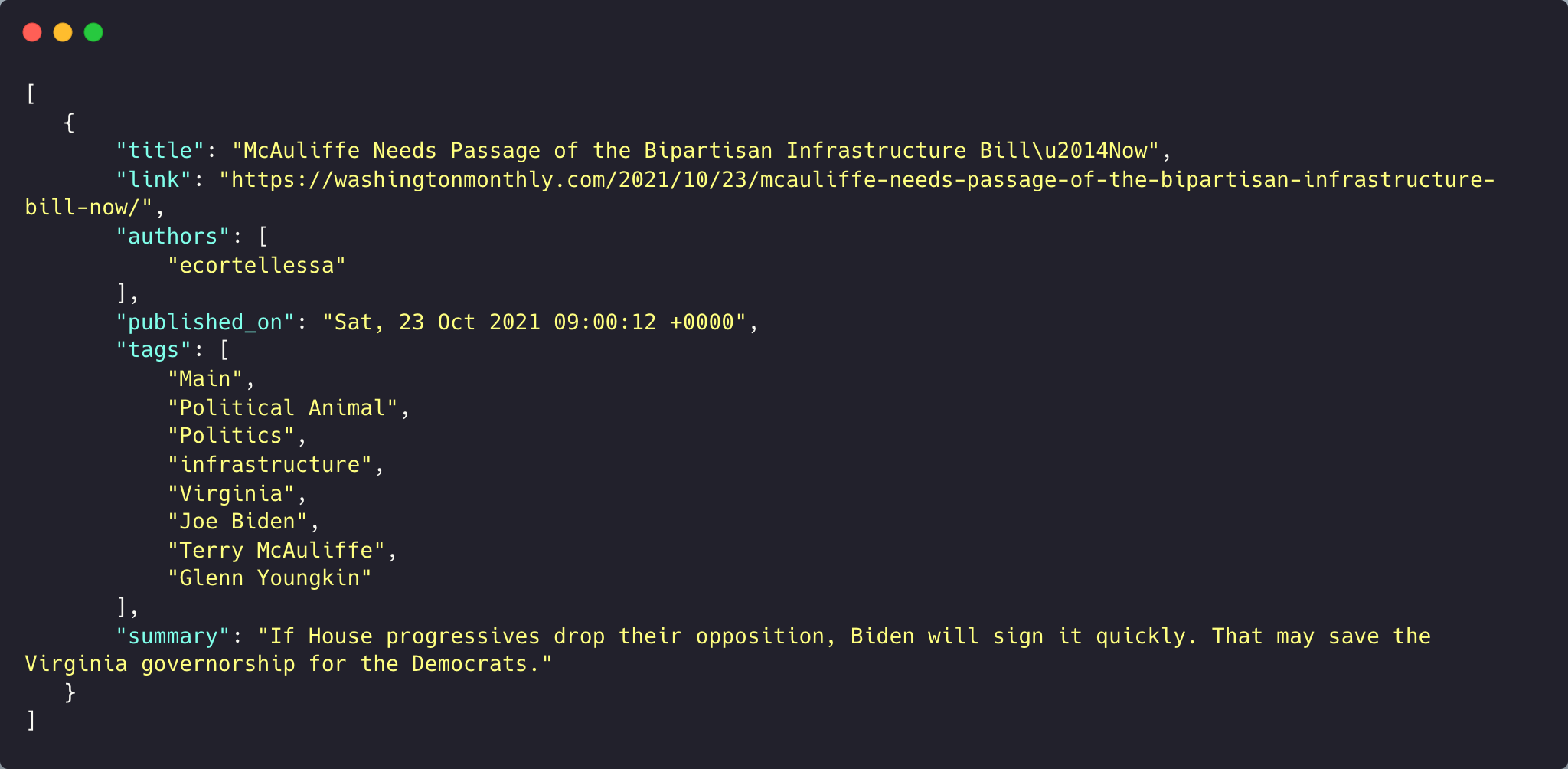
While these were the tools to obtain news information, you can also use the “describe_url” function to get details related to websites. For example, we took 3 news URLs, and obtained this information related to them:
We got the data points such as URL, language, country, and topics for all the websites that we passed in a list.
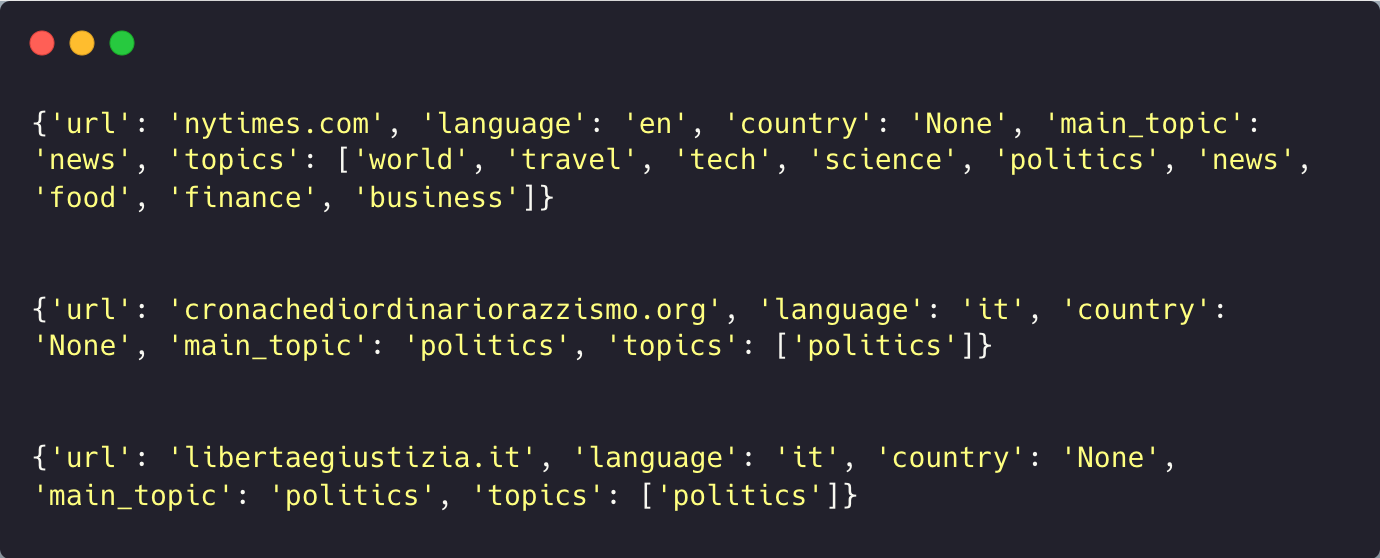
You can see how it identified the 2nd and 3rd websites to be of Italian origin and the topics for all 3. Some data points like the country may not be available for all the websites since they are providing services worldwide.
Feedparser
The FeedParser Python library runs on Python3.6 or later and can be used to parse syndicated feeds. In short, it can parse RSS or Atom feeds and provide you with the information in the form of easy-to-understand data points. It acts as a news scraper and we can use it to mine news data from RSS feeds of different news websites.
To install run: pip install feedparser
By default, you would need to first find the RSS URL for feedparser to parse. However, in this article, we will use feedparser in conjunction with the feedsearch Python library that can be used to find RSS URLs by scraping the URL of a news website.
import feedparser

feed = feedparser.parse('https://rss.nytimes.com/services/xml/rss/nyt/HomePage.xml')

for entry in feed.entries[:3]:
    print(entry.title)

# OUTPUT
# Bond Sell-Off Sends Borrowing Costs to Highest Level Since 2007
# Gulf Oil Giants Push to Expand Overseas Stockpiles as Iran War Drags On
# Two Ships Transiting Strait of Hormuz Are Attacked as Oil Prices Rise
The code above uses feedparser to parse the NYTimes homepage RSS feed and print the first few headlines.
If you don’t know a website’s feed URL, the feedsearch and feedsearch-crawler libraries were built to discover feeds. Neither has been updated in years, and feedsearch no longer imports cleanly on a current Python install.
Newspaper3k
NewsPaper3k is a Python library for web scraping news articles by just passing the URL. A lot of the libraries that we saw before gave us the content but along with a lot of HTML tags and junk data. This library would help you fetch the content and a few more data points from almost any newspaper article on the web.
This Python web scraping library can be combined with any of the libraries above to extract the full-text body of the article.
Newspaper3k has the same problem. There has been no release since September 2018, and it still pins dependencies from that year. The good news is that newspaper4k, an actively maintained fork, keeps the same API. Install it with pip install newspaper4k and your existing import newspaper code keeps working. The example below runs on the fork.
To install run: pip install newspaper3k
For example, we ran the library on an article from the Guardian:
from newspaper import Article

url = 'https://www.theguardian.com/world/2026/aug/17/ebola-outbreak-drc-democratic-republic-of-congo-deadliest-in-history'
article = Article(url)
article.download()
article.parse()
article.nlp()

article.title
# OUTPUT
# 'Ebola outbreak in Democratic Republic of the Congo now deadliest in country’s history'

len(article.text), article.keywords[:3]
# OUTPUT
# (4469, ['deadliest', 'outbreak', 'ebola'])
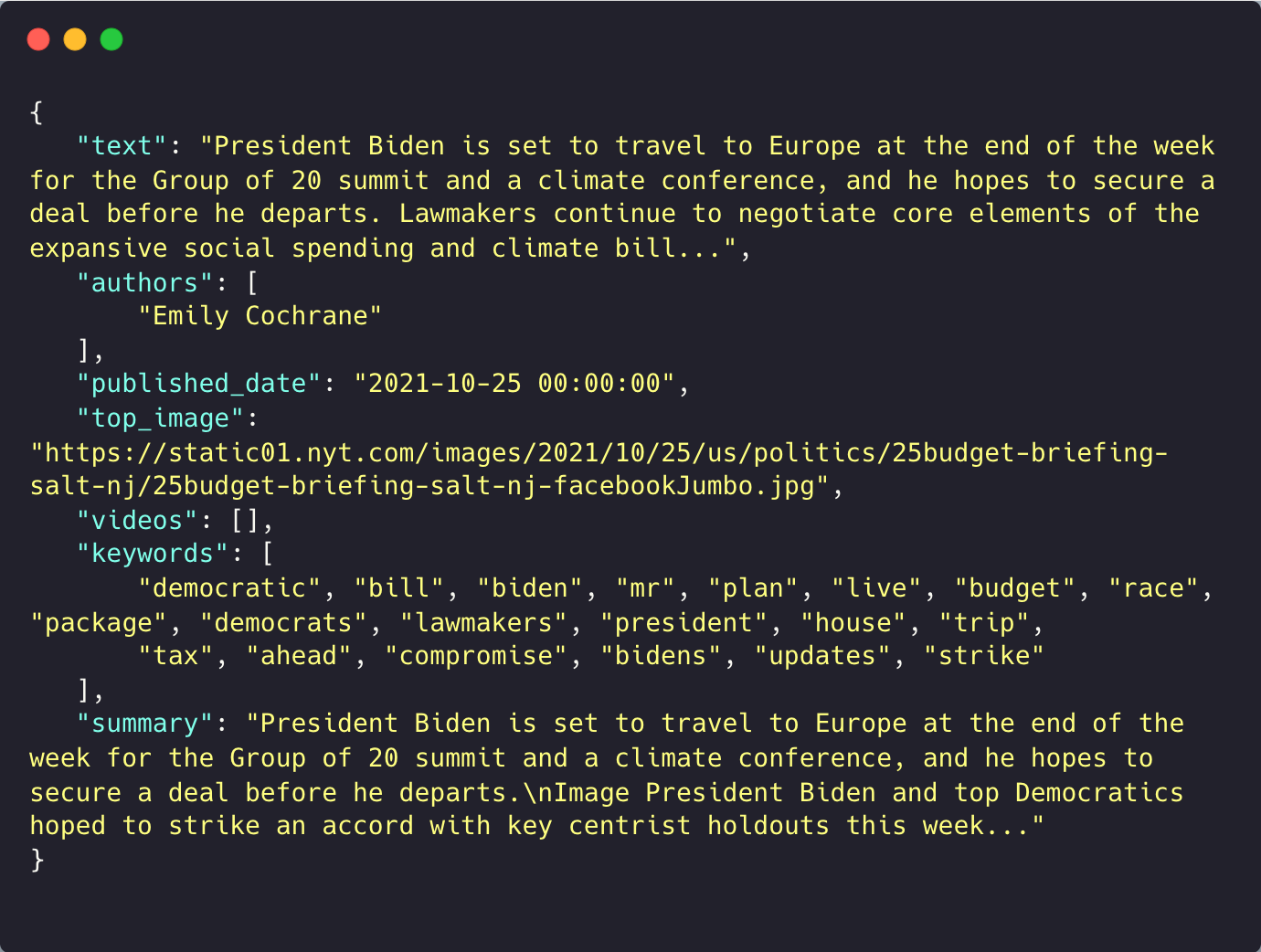
Here is what an earlier run looked like, with the text and the summary truncated. In total you would get:
- article text, free from any tags
- authors
- published date
- thumbnail images for the article
- videos if any attached to the article
- keywords associated with the article
- summary
Trafilatura
We added this section in 2026, after two of the libraries above stopped shipping releases. Trafilatura is a Python library that downloads a page and extracts the article text without the surrounding boilerplate, along with metadata like the title, the author, and the publication date. Version 2.2.0 shipped in July 2026, and of everything in this list it’s the article scraper we’d pick first for full-text extraction today.
To install run: pip install trafilatura
import trafilatura

url = 'https://www.newscatcherapi.com/blog/google-news-rss-search-parameters-the-missing-documentaiton'
html = trafilatura.fetch_url(url)

text = trafilatura.extract(html)

doc = trafilatura.bare_extraction(html, with_metadata=True)
doc.title, doc.author, doc.date
# OUTPUT
# ('Google News RSS Search Parameters: The Missing Docs | NewsCatcher', 'Artem Bugara', '2024-05-07')
That call returned the metadata tuple above plus 10,621 characters of clean article text, free of tags and navigation. If you’re feeding a pipeline, the trafilatura Python package can also return the whole result as JSON, XML, CSV or Markdown.
Conclusion & Final Comparison
We created a simple comparison of all five Python web scraping libraries that can be used in DIY Python projects to create a content aggregator, to give a clear picture of the strengths and weaknesses.
PyGoogleNews
- An alternative to Google News API
- Fetches multiple data points for each news article
- Keywords can be passed to find associated news
- Complex queries with logical operators can be used
NewsCatcher
- Can be used to get news data from multiple websites
- Fetches multiple data points for each news article
- You can filter news by topic, country, or language
Feedparser
- Can be used to parse an RSS feed and obtain important information
- Fetches multiple data points for the RSS feed passed
Newspaper3k
- Helps extract all the data points from a news article link
- Helps extract data points as well as NLP based results from a news article
Trafilatura
- Extracts clean full text from almost any article page
- Returns metadata like the title, author, and publication date
- Actively maintained, unlike Newspaper3k and the newscatcher package







.png)


.png)