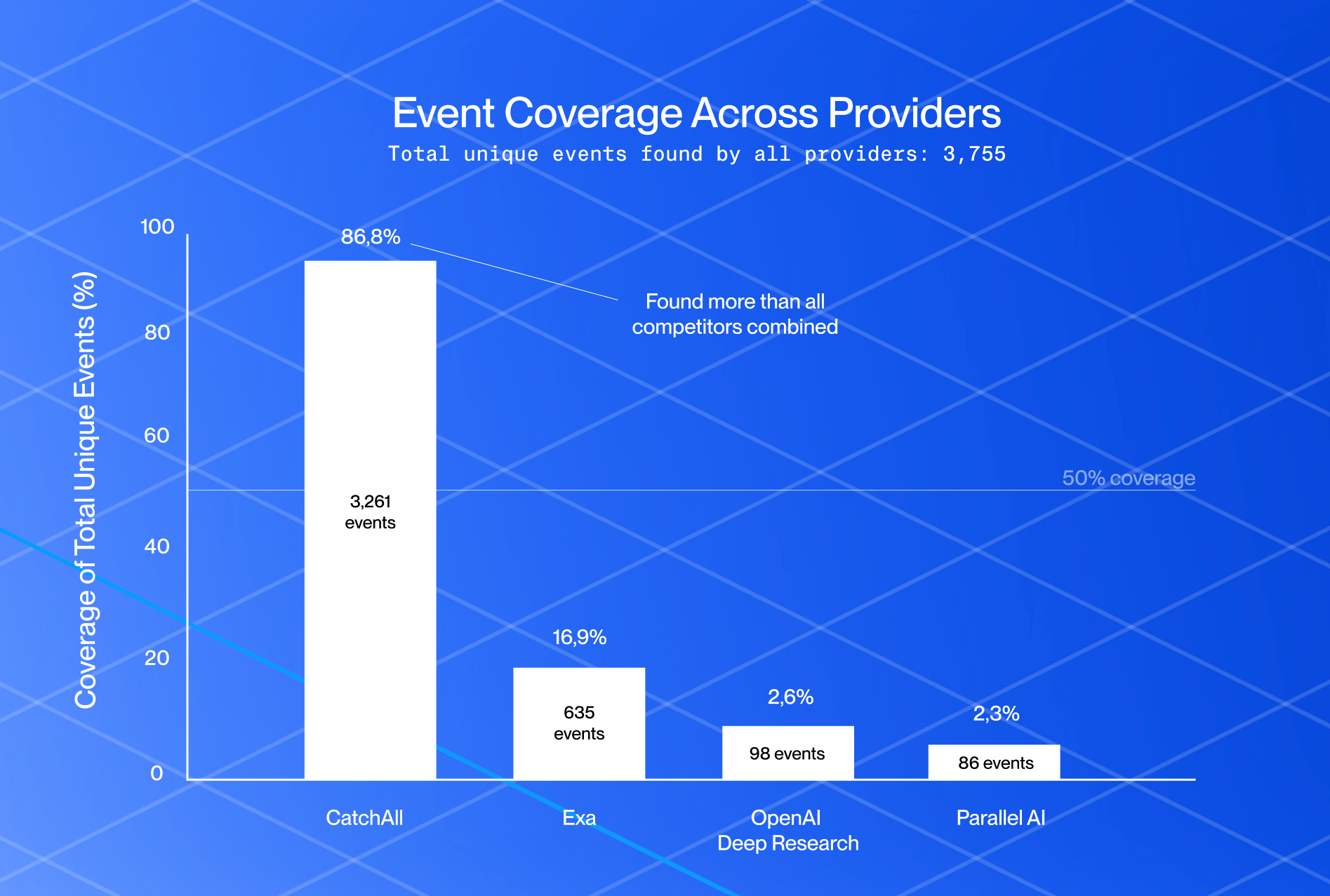











tl;dr: We'll use CatchAll as a recall-first pipeline that runs structured search queries for new local business openings and returns results as structured JSON. The core tracker applies skill-defined validators and enrichments, deduplicates results, and routes them to terminal output, optional Gmail alerts, and recurring monitoring workflows.
A companion FastAPI demo extends the same workflow into a map-based dashboard.
Introduction
Every new business opening is a buying signal hiding in plain sight.
In Q3 2025, the U.S. alone recorded 323,000 new establishment births, creating 967,000 jobs. Each opening creates a short window where businesses choose vendors, hire teams, buy tools, and set up operations. Spotting those signals early means getting there before the competition.
But opening signals are scattered across local news, Google Maps, press releases, business directories, permit pages, and coming soon announcements. A useful tracker needs two things: broad coverage and reliable validation, so teams can find enough leads without chasing stale, duplicate, or unconfirmed results.
In this tutorial, we’ll build one with the CatchAll Python SDK: a high-recall Web Search API that finds confirmed openings, validates each signal, and turns fragmented announcements into structured leads.
Try the demo: the Local Business Tracker finds confirmed new business openings anywhere in the world using the CatchAll Python SDK, validates each result against skill-defined opening criteria, and streams structured leads onto a live map. From there, users can save datasets, export or email results, monitor searches, and explore source-backed records in a dashboard with AI-assisted record chat.
This tutorial focuses on the core tracker repo: a lightweight Python CLI that runs CatchAll searches, validates and enriches opening records, deduplicates results, prints them to the terminal, sends optional Gmail alerts, and creates a recurring monitor.
Why tracking local business openings is still broken
Search for “tools to track new business openings in my area,” and you’ll find plenty of adjacent solutions: Google Alerts, local SEO tools, business databases, directory scrapers, and manual research workflows.
They help, but most are not built for early detection.
- Manual search doesn’t scale: Teams set up Google Alerts, scan local newspapers, and check Google Maps for recently opened labels. But the results are scattered, inconsistent, and hard to validate across multiple locations.
- Local SEO tools help after launch: Platforms like BrightLocal and Semrush Local are great for managing listings, rankings, and reviews once a business is already visible. But they’re not designed to catch early opening signals.
- Business databases are retrospective: Tools like Apollo, ZoomInfo, and Openmart help teams find existing businesses, contacts, and enriched company data. Openmart also offers newly opened businesses, which proves the signal is valuable. But by the time a business appears in a database or local listing, the best outreach window may be closing.
Anatomy of a hyperlocal new business opening tracker
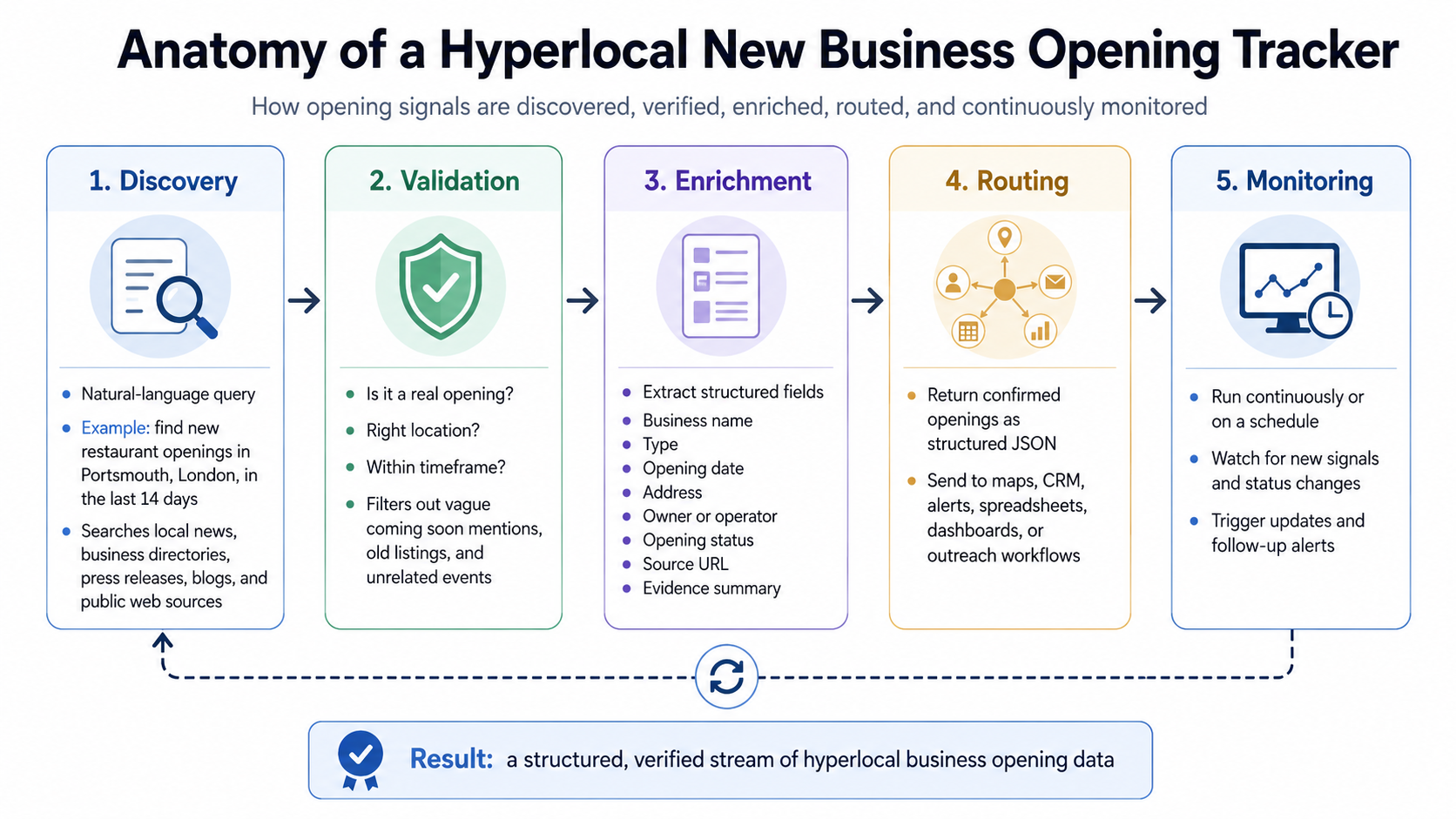
Automated local business opening trackers are designed to collect opening signals from across the web, verify whether each signal points to a real business opening, organize the results into structured records, and route them into internal or frontend workflows.
An automated local business tracking system should follow five stages:
- Discovery: Run opening-specific searches like "grand opening restaurant Singapore, last 14 days" or "now open gym Austin, last 10 days".
- Validation: Check whether each result is a real opening, in the right location, and within the selected timeframe.
- Enrichment: Extract the fields teams need to act on: business name, type, opening date, address, owner or operator, opening status, source URL, evidence summary, or what’s relevant to you.
- Deduplication: Merge overlapping records found through multiple signal terms.
- Routing: Send the cleaned records to a terminal, email, a dashboard, a CRM, a spreadsheet, or a monitoring workflow.
How to Build a Local Business Tracker Using CatchAll
CatchAll is a Web Search API that helps vendors, suppliers, sales teams, market researchers, and local news publishers monitor new business openings by surfacing confirmed opening events across the open web.
Setup
Create a virtual environment and install the dependencies:
python3 -m venv .venv
source .venv/bin/activate  # macOS/Linux
# .venv\Scripts\activate   # Windows PowerShell

pip install -r requirements.txt
Create a .env file
CATCHALL_API_KEY=your_catchall_api_key_here

# Optional, only needed for email alerts
GMAIL_ADDRESS=you@gmail.com
GMAIL_APP_PASSWORD=your_gmail_app_password_here
Run the tracker, and the script prompts you for business type, country, city, timeframe, and optional email recipient.
Step 1: Define the skill
Before writing code, we define what a new business opening means using a SKILL.md.
This matters because local opening searches can return many near-matches that are not useful leads: permit filings, renovation updates, vague coming soon mentions, old openings, or businesses outside the searched location.
The tracker uses a skill file to give CatchAll task-specific instructions. In this project, the skill defines four things:
- Query rules: use opening-specific phrases like grand opening, now open, and soft opening
- Validators: keep only records that are real openings, in the right location, and within the selected timeframe
- Enrichments: extract fields like business name, business type, opening date, location, owner/operator, evidence summary, and source URL
- Fallback rules: expand timeframe, geography, or business type when no results are found
Here’s a short excerpt from the skill:
A result qualifies as a business opening only if it meets one of these criteria:

- The business has physically opened its doors to paying customers
- A grand opening, ribbon cutting, or soft launch event has taken place
- An official opening date has been announced by the business or a credible source

These do not qualify:

- Rumours or speculation
- Permit filings or zoning approvals with no stated opening date
- Construction updates without a confirmed opening date
- Undated “coming soon” mentions
- Businesses outside the searched location
The full skill file lives in the repo: skills/local-business-openings.md
In code, the tracker loads that markdown file and passes it as context to CatchAll. The validators and enrichments are defined separately as structured Python dictionaries, so the API knows which checks to apply and which fields to extract.
# core/skill.py
from pathlib import Path

SKILL_CONTEXT = Path("skills/local-business-openings.md").read_text()

VALIDATORS = [
    {"name": "is_business_opening", "type": "boolean"},
    {"name": "location_match", "type": "boolean"},
    {"name": "event_in_timeframe", "type": "boolean"},
]

ENRICHMENTS = [
    {"name": "business_name", "type": "text"},
    {"name": "business_type", "type": "text"},
    {"name": "opening_date", "type": "date"},
    {"name": "opening_qualifier", "type": "text"},
    {"name": "location_details", "type": "text"},
    {"name": "owner_operator", "type": "text"},
    {"name": "evidence_summary", "type": "text"},
    {"name": "source_url", "type": "text"},
]
Step 2: Run three opening-signal queries
The tracker runs three queries for each search:
SIGNAL_TERMS = ["grand opening", "now open", "soft opening"]
Why three? Because different sources describe openings differently. One article might say “grand opening,” another might say “now open,” and a local blog might describe the same business as having a “soft opening.”
Running all three improves recall. The query builder looks like this:
@dataclass
class SearchConfig:
    business_type: str
    city: str
    country: str
    days: int
    email: str | None

    @property
    def location(self) -> str:
        return f"{self.city}, {self.country}"

    @property
    def queries(self) -> list[str]:
        return [
            f"{signal} {self.business_type} {self.location} last {self.days} days"
            for signal in SIGNAL_TERMS
        ]
For example, if the user searches for restaurants in Singapore over the last 14 days, the tracker runs:
grand opening restaurant Singapore, Singapore last 14 days
now open restaurant Singapore, Singapore last 14 days
soft opening restaurant Singapore, Singapore last 14 days
The jobs are submitted sequentially. That is important because many API plans limit how many jobs can run at once. The helper _to_dict() converts SDK objects into plain dictionaries:
def _to_dict(obj) -> dict:
    if isinstance(obj, dict):
        return obj
    if hasattr(obj, "dict"):
        return obj.dict()
    try:
        return vars(obj)
    except TypeError:
        return {}
That makes the next normalization step safer because the code can call .get() without raising an AttributeError.
Step 3: Normalize records
Raw CatchAll records contain nested enrichment data. The tracker flattens each record into a consistent shape.
def normalize_record(record: dict) -> dict:
    enrichment = record.get("enrichment", {})
    citations  = record.get("citations", [])

    return {
        "record_id":         record.get("record_id"),
        "record_title":      record.get("record_title"),
        "business_name":     enrichment.get("business_name"),
        "business_type":     enrichment.get("business_type"),
        "opening_date":      enrichment.get("opening_date"),
        "opening_qualifier": enrichment.get("opening_qualifier"),
        "location_details":  enrichment.get("location_details"),
        "owner_operator":    enrichment.get("owner_operator"),
        "evidence_summary":  enrichment.get("evidence_summary"),
        "source_url":        enrichment.get("source_url") or (
            citations[0].get("link") if citations else None
        ),
        "citations":         citations,
        "confidence":        enrichment.get("enrichment_confidence"),
    }
This gives every downstream step one predictable record format.
Step 4: Deduplicate across queries
Because the tracker runs multiple signal queries, the same business can appear more than once. The tracker deduplicates using fuzzy matching on both business name and location.
from rapidfuzz import fuzz

def deduplicate(records: list) -> list:
    seen, result = [], []

    for record in records:
        name = record.get("business_name") or ""
        location = record.get("location_details") or ""

        if not name or not location:
            continue

        is_dup = any(
            fuzz.token_sort_ratio(name, s_name) >= 85
            and fuzz.token_sort_ratio(location, s_loc) >= 60
            for s_name, s_loc in seen
        )

        if not is_dup:
            seen.append((name, location))
            result.append(record)

    return result
This handles common real-world variations: punctuation changes, translated names, abbreviated addresses, and slightly different location formatting.
A record is only dropped if both the business identity and location match closely enough, so two different businesses at the same address are not automatically merged.
Step 5: Filter useful records
After validation and deduplication, you can filter records based on what your workflow needs.
For immediate outreach, businesses that are already open may be most useful:
now_open = filter_by_qualifier(deduplicated, ["now_open", "event_held"])
For pipeline building, announced openings can be useful too:
upcoming = filter_by_qualifier(deduplicated, ["date_announced"])
The repo includes simple helpers to filter and return the relevant fields:
def filter_by_qualifier(records: list, qualifiers: list) -> list:
    return [r for r in records if r.get("opening_qualifier") in qualifiers]

def filter_by_confidence(records: list, level: str = "high") -> list:
    return [r for r in records if r.get("confidence") == level]

def filter_by_business_type(records: list, business_type: str) -> list:
    target = business_type.lower()
    return [r for r in records if target in str(r.get("business_type") or "").lower()]
Step 6: Route results
At minimum, the tracker prints results to the terminal.
def print_results(results: list[dict]) -> None:
    for i, r in enumerate(results, 1):
        print(f"{i}. {r.get('business_name') or 'Unknown'}")
        for label, key in [
            ("Type", "business_type"),
            ("Location", "location_details"),
            ("Status", "opening_qualifier"),
            ("Date", "opening_date"),
            ("Evidence", "evidence_summary"),
            ("Source", "source_url"),
        ]:
            value = r.get(key)
            if value:
                display = value.replace("_", " ") if key == "opening_qualifier" else value
                print(f"   {label:<10}{display}")
        print()
If the user provides an email address, the tracker sends a simple HTML table with the business name, type, location, status, opening date, and source link.
if config.email and deduplicated:
    send_results_email(
        to_email=config.email,
        results=deduplicated,
        query=f"{config.business_type} openings in {config.location} last {config.days} days",
    )
To enable email, add:
GMAIL_ADDRESS=you@gmail.com
GMAIL_APP_PASSWORD=your_gmail_app_password
Generate a Gmail app password at https://myaccount.google.com/apppasswords
Step 7: Turn a completed job into a monitor
Once a job completes, you can use it as the reference for a recurring monitor.
def create_monitor(client: CatchAllApi, job_id: str) -> None:
    try:
        monitor = client.monitors.create_monitor(
            reference_job_id=job_id,
            schedule="every day at 8 AM UTC",
            backfill=True,
        )
        print(f"  Daily monitor created: {monitor.monitor_id}")
    except Exception:
        print("  Daily monitor skipped — you've hit your plan limit")
This is useful when you want the same opening search to run daily. If your plan allows only one active monitor, create it from the most important query or manage monitors from the CatchAll dashboard.
Real-world use cases for local business opening tracking
Local business opening data can support a lot of workflows, but a few use cases:
- B2B sales and vendors: New restaurants need POS systems, payment processing, suppliers, uniforms, insurance, and cleaning services. New clinics need EHR software, medical supplies, staffing support, and compliance tools. The earlier teams spot the opening signal, the better their chance of reaching out before vendor decisions are locked in.
- Local publishers and city guides: Instead of manually checking Instagram, press releases, and local news sites, publishers can track confirmed openings and turn them into weekly “new in town” roundups.
- Market research: A spike in new gyms, cafés, clinics, or childcare centers can indicate population growth, shifting demand, business expansion, or a commercial real estate recovery. Opening data becomes an early signal of local market movement.
- Local suppliers and service providers: A linen company, food distributor, cleaning service, or signage vendor can track “now open,” “grand opening,” and “coming soon” signals across selected cities, then turn those results into a structured lead list.
Summary
New business openings are high-value sales signals, but they are difficult to track manually. The research area is broad and fragmented across the web.
In this tutorial, we built a CatchAll-powered Python tracker that finds confirmed openings, extracts structured fields, deduplicates results, prints leads to the terminal, sends optional Gmail alerts, and creates recurring CatchAll monitors.
Clone the tracker repo for the Python automation backbone, or try the companion demo to see how the same workflow can become a map-based dashboard with saved datasets, exports, and AI-assisted record chat.
Get 2,000 free credits at platform.newscatcherapi.com.







.png)



.png)