









TL;DR: We'll wire CatchAll into a Langchain web search agent, hand it Gemini 2.5 Flash for reasoning, and turn one open-ended question ("AI startup funding in Q1 2026") into three iterative searches and a cited markdown report. Full code below. The retrieval layer determines whether your agent conducts research or just appears to.
LLMs are improving at reasoning faster than they're improving at knowing things. Anything time-sensitive, vertical-specific, or scattered across thousands of pages still has to come from outside the model. That's the gap external retrieval fills, and it is why modern AI agents increasingly rely on search and browsing tools instead of depending only on prompts. OpenAI's own research and product releases around deep research agents describe web browsing, retrieval, and tool use as core capabilities for handling complex, real-world tasks.
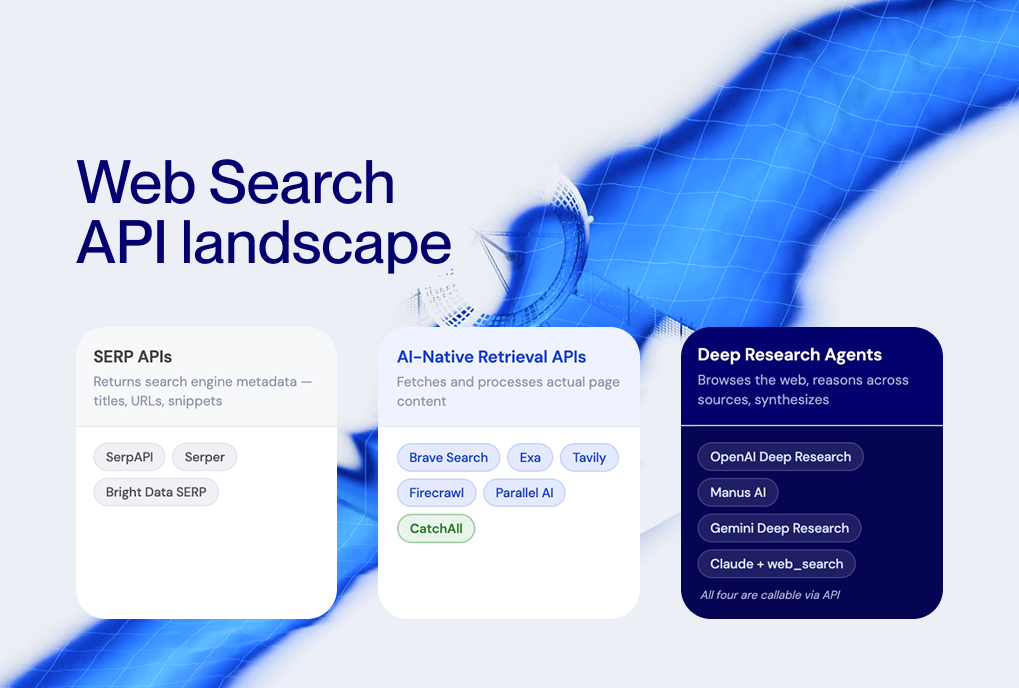
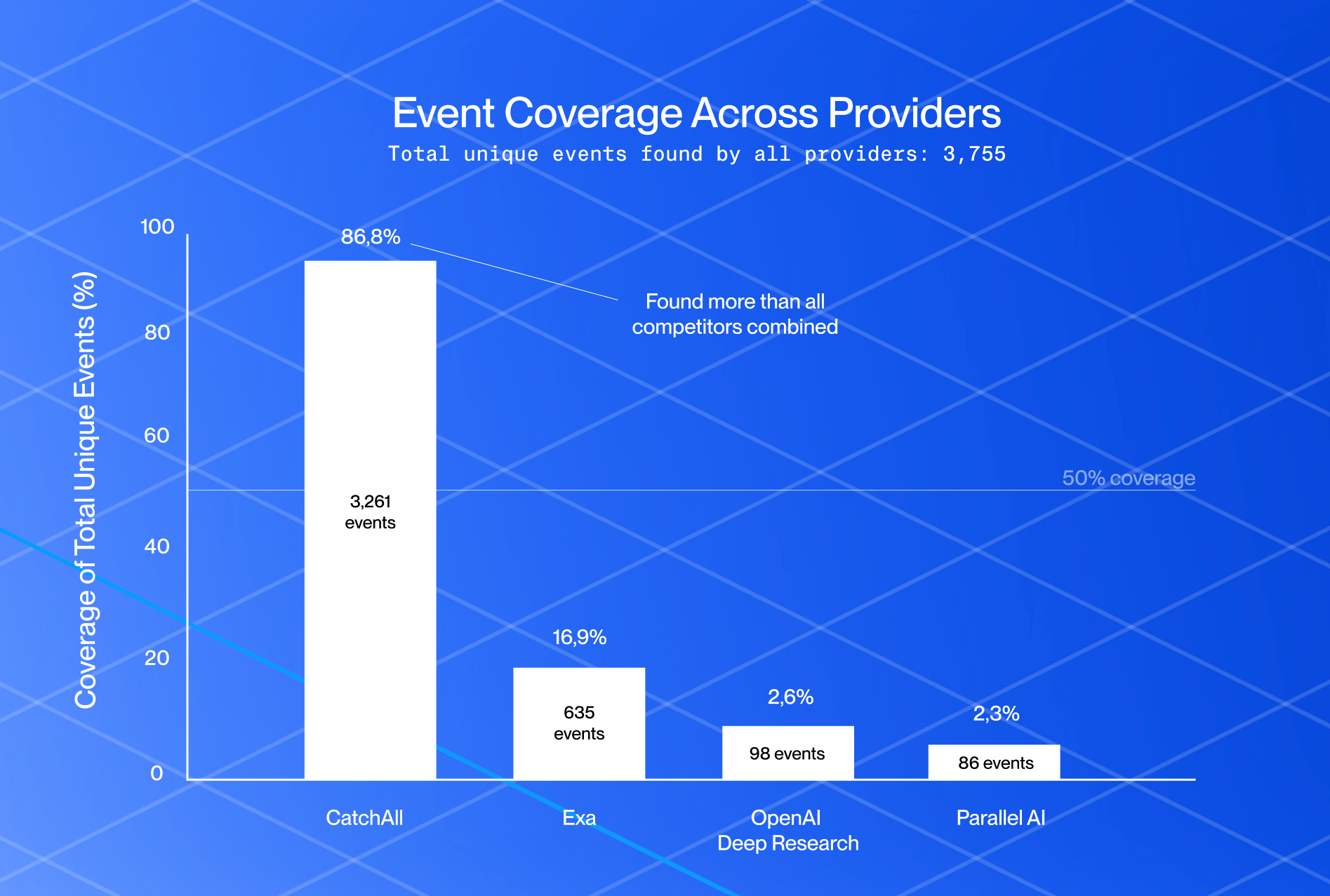
The reflex move is to bolt on a SERP API, run one query per user question, and call it research. It isn't. Single-query retrieval works only when a single page has the answer. It quietly fails when the answer is 200 funding rounds spread across regional press, product blogs, and SEC filings, and the API hands you back the 10 most-clicked. The agent then writes a confident summary on top of a 5% sample. Nobody notices because the prose looks fine.
Two things fix this. First, an agent framework that runs multiple searches and reasons between them. We'll use LangChain. Second, a search tool built for coverage rather than ranking. We'll use CatchAll, which sweeps 2B+ pages per query and returns structured records instead of links. The rest of this post is the build.
What Is a Deep Research Agent?
A deep research agent is an LLM that breaks a complex question into multiple searches, reads the results between calls, and keeps going until it has enough evidence to write a cited answer. The "iterates" part is what matters. Single-step retrieval is one query, top 10 results, summarize. Deep research is N queries, structured records, decisions about what's missing, then synthesis.
Traditional search APIs hurt this loop in two predictable ways.
- Low recall: Ranking favors the most-linked pages, so an agent aggregating events across hundreds of sources misses most of them before reasoning even starts.
- Ranking bias: SEO-optimized publishers dominate results, which skews any aggregation toward whoever spent on content marketing rather than what actually happened.
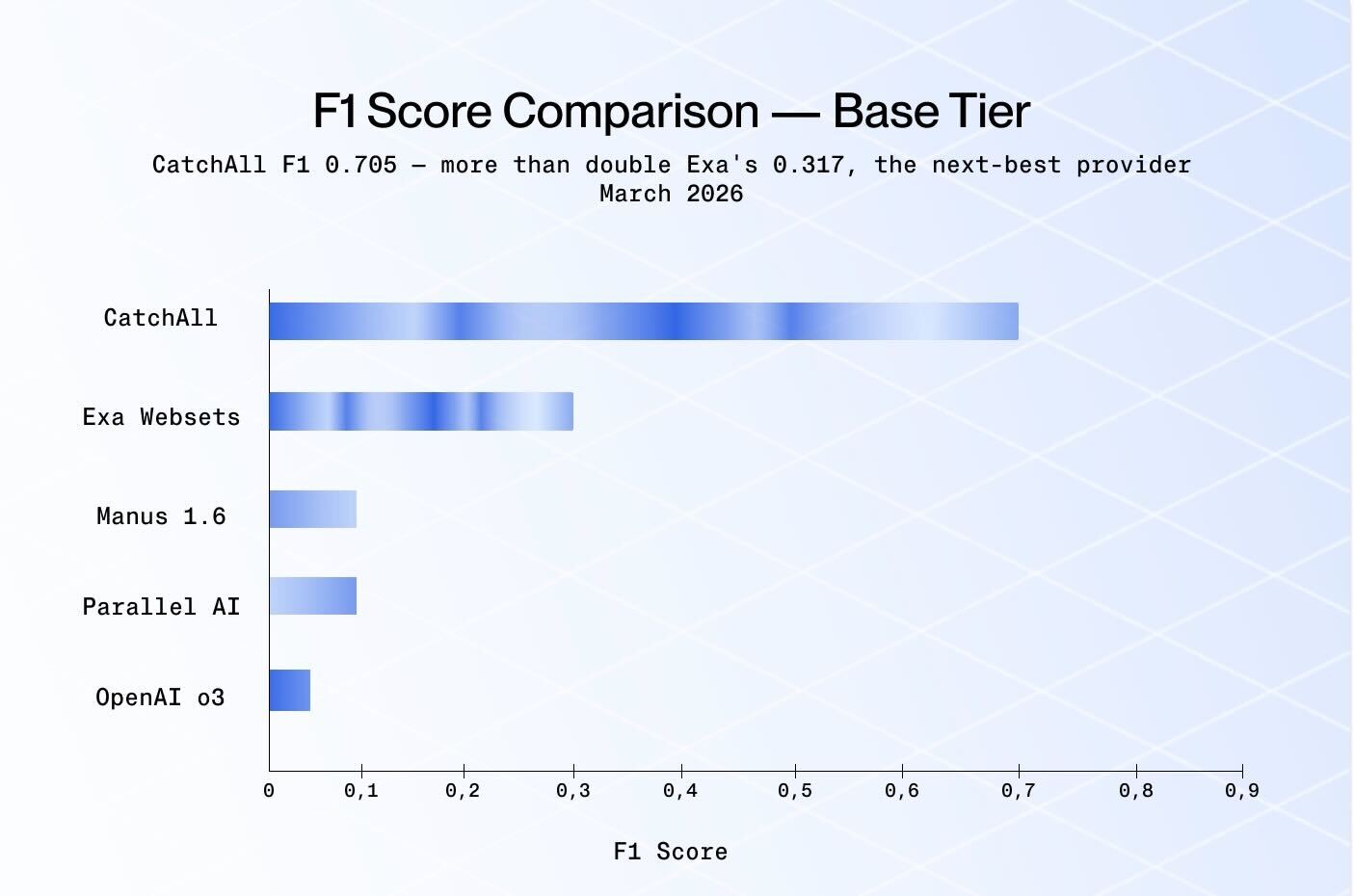
Recall-first retrieval inverts the priority. CatchAll returns the dataset, not the top 10 links, which is the right primitive when an agent has to reason over what it found.
LangChain handles the core execution and coordination logic in this stack. It exposes external data through tools, runs the ReAct loop, and manages the messages flowing between the LLM and those tools. The LLM picks queries. CatchAll returns evidence. LangChain runs the loop.
How to Architect a Deep Research Agent (LangChain Approach)
A working LangChain web search agent research agent has four parts. Get the retrieval part wrong, and the other three can't compensate.
Core components
- LLM (reasoning layer). The model decides which queries to run, when to run another one, and when to stop. We use Gemini 2.5 Flash for cost and latency, but any tool-calling model works (Claude, GPT-4, Llama). The LLM never touches the web directly. It only emits tool calls.
- Tools (action layer). Tools are how the agent reaches systems outside the model: search APIs, databases, and internal services. For this build, the agent gets one tool, a wrapper around CatchAll's submit-poll-pull flow.
- Memory (optional). For a single research run, the message history LangGraph keeps in state is enough. Persistent memory matters when an agent runs across sessions or builds on prior work; we don't need it here.
- Orchestration layer (LangChain). LangChain wires the LLM to the tools and runs the ReAct loop. You don't write the reasoning loop yourself. create_deep_agent builds it, handles tool execution, and manages state between iterations.
Architecture of the Research Agent
The lifecycle of one research run looks like this:
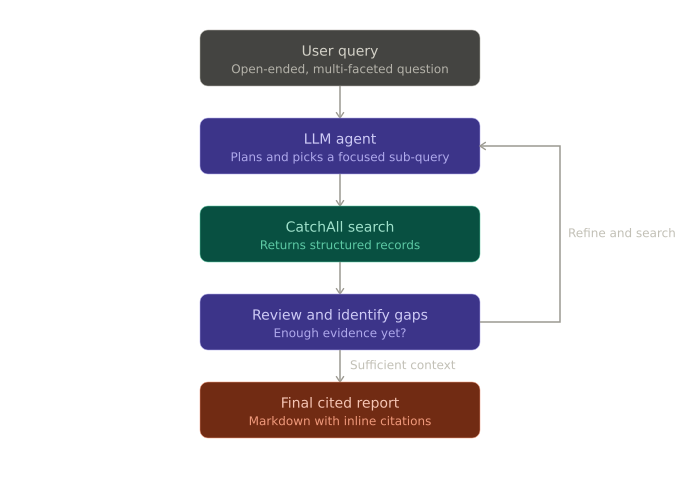
- A research run starts with an open-ended, multi-faceted query such as "Who are the most active AI startup investors in 2026, and what other bets have they made beyond their most headline deals?
- The LLM analyzes the request and determines that it needs external information to answer reliably. It chooses an initial sub-topic to investigate and calls the CatchAll tool with a focused search query.
- CatchAll sweeps the index and returns structured records instead of ranked links. The LLM reviews the results, extracts relevant information, and identifies what is still missing or underrepresented.
- From there, the agent refines the next query based on the gaps it found and repeats the process. This loop can run multiple times as the agent expands coverage, validates findings, and gathers enough evidence to answer the original question.
- Once the agent has sufficient context, it synthesizes the findings into a final markdown report with inline citations and a source list.
Where CatchAll fits in the pipeline
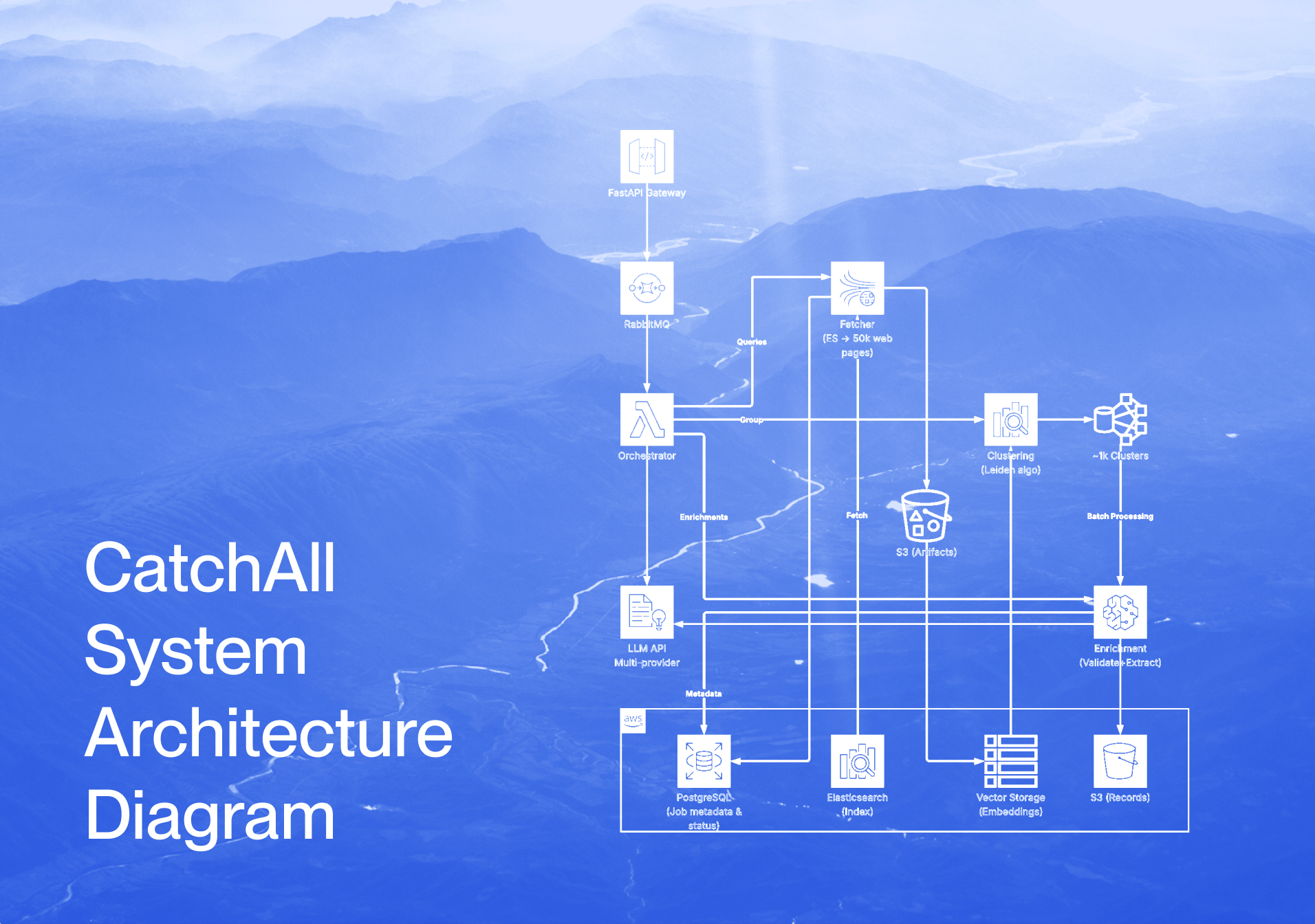
CatchAll lives at the tool-call stage as the retrieval foundation. The agent never sees raw web pages. It sees CatchAll's structured output containing deduplicated event records, source URLs, dates, and metadata. That structure is what lets the LLM produce a citable report at the end. If the data going in is just a list of links, the data coming out is just a guess with footnotes.
A clean way to hold the division of labor in your head:
- LangChain = orchestration. Manages the loop, tool execution, and message state.
- LLM = reasoning. Decides what to search and when to stop.
- CatchAll = retrieval. Returns the dataset the LLM reasons over.
Most agents fail at the third one because teams treat retrieval as a checkbox instead of the foundation. More on the recall argument here: Why Recall Beats Precision for Real-World AI Research.
How to Set Up a LangChain Research Agent with CatchAll
The agent we're building has one job. Take a compound research question, decompose it into focused CatchAll searches, and synthesize the structured records into a cited report. CatchAll handles the retrieval, while LangChain handles the planning loop.
Note: We maintain an official CatchAll + LangChain integration with a prebuilt tool wrapper. The walkthrough below builds the wrapper from scratch so you can see what's happening end to end, but for production, you can drop in the official integration.
These packages require Python 3.11 or newer; deepagents explicitly enforces this. Check with python --version before proceeding.
1. Install Dependencies
Add the following packages:
- langchain and langchain-google-genai for the agent framework and the LLM
- deepagents for the orchestrator/sub-agent pattern (create_deep_agent)
- newscatcher-catchall-sdk for the official CatchAll Python client
python-dotenv for loading API keys
pip install deepagents langchain langgraph langchain-google-genai requests pydantic2. Configure API Access
Two keys are needed:
- Gemini powers the agent's reasoning. Get one at Google Studio.
- NewsCatcher CatchAll powers retrieval. Get one at NewsCatcher.
from google.colab import userdata
gemini_key = userdata.get("GEMINI_API_KEY")
newscatcher_key = userdata.get("CATCHALL_API_KEY")
If you're running this outside Colab, swap userdata.get(...) for os.getenv(...) after loading a .env file with python-dotenv.
3. Create a CatchAll Search Tool
LangChain agents call external services through tools, which are typed, callable wrappers that the LLM invokes during its reasoning loop.
CatchAll is asynchronous. You submit a job, poll until it's done, then pull results. The wrapper below collapses that whole lifecycle into a single synchronous call that the agent can treat like any other function.
Here's the full tool:
import time
import json
from datetime import datetime, timedelta, timezone
from typing import Optional, Type

from pydantic import BaseModel, Field
from langchain.tools import BaseTool
from newscatcher_catchall import CatchAllApi


class CatchAllSearchInput(BaseModel):
    query: str = Field(..., description="Natural language description of events to find.")
    context: Optional[str] = Field(default=None, description="Extraction guidance for fields to pull.")
    days_back: int = Field(default=14, description="How many days back to search.")


class CatchAllSearchTool(BaseTool):
    name: str = "catchall_search"
    description: str = (
        "Search 2B+ web pages for real-world events using NewsCatcher CatchAll. "
        "Takes 10-15 minutes. Returns structured records with citations."
    )
    args_schema: Type[BaseModel] = CatchAllSearchInput

    def _run(self, query: str, context: Optional[str] = None, days_back: int = 14) -> str:
        client = CatchAllApi(api_key=newscatcher_key)
        now = datetime.now(timezone.utc)

        # 1. Submit
        job = client.jobs.create_job(
            query=query,
            start_date=now - timedelta(days=days_back),
            end_date=now,
            **({"context": context} if context else {}),
        )

        try:
            # 2. Poll until complete (up to 60 minutes)
            for _ in range(120):
                time.sleep(30)
                status = client.jobs.get_job_status(job.job_id)
                if status.status == "failed":
                    return json.dumps({"error": "job failed", "valid_records": 0})
                if status.status == "completed":
                    break
            else:
                return json.dumps({"error": "timed out", "valid_records": 0})

            # 3. Fetch results
            results = client.jobs.get_job_results(job.job_id)
            return json.dumps({
                "query":         query,
                "valid_records": results.valid_records,
                "records":       [r.model_dump() for r in results.all_records[:30]],
            }, indent=2, default=str)

        finally:
            try: client.jobs.delete_job(job.job_id)
            except Exception: ...
4. Initialize the Agent
We use LangChain's create_deep_agent from the deepagents package. This is the modern, officially recommended approach for multi-step research workflows.
The architecture has two layers:
- Orchestrator. Plan the research, delegate to sub-agents, and synthesize the report. Never call CatchAll directly.
- Research sub-agent. Receive a focused task, call CatchAllSearchTool, and return structured findings.
This separation keeps each sub-agent's context clean and lets the orchestrator reason over compact summaries instead of raw record dumps.
import os
from datetime import datetime

from deepagents import create_deep_agent
from LangChain_google_genai import ChatGoogleGenerativeAI

os.environ["GOOGLE_API_KEY"] = gemini_key

max_concurrent_research_units = 2
max_researcher_iterations     = 2
current_date = datetime.now().strftime("%Y-%m-%d")

INSTRUCTIONS = (
    RESEARCH_WORKFLOW_INSTRUCTIONS
    + "\n\n"
    + "=" * 80
    + "\n\n"
    + SUBAGENT_DELEGATION_INSTRUCTIONS.format(
        max_concurrent_research_units=max_concurrent_research_units,
        max_researcher_iterations=max_researcher_iterations,
    )
)

research_sub_agent = {
    "name":          "catchall-research-agent",
    "description":   "Delegate a single focused research topic. The sub-agent will run a CatchAll search and return structured findings.",
    "system_prompt": RESEARCHER_INSTRUCTIONS.format(date=current_date),
    "tools":         [CatchAllSearchTool()],
}

model = ChatGoogleGenerativeAI(
    model="gemini-2.5-flash-lite",
    temperature=0,
)

agent = create_deep_agent(
    model=model,
    tools=[],
    system_prompt=INSTRUCTIONS,
    subagents=[research_sub_agent],
)

print("Agent initialized.")
print(f"LLM:        {model.model}")
print(f"Sub-agents: {[research_sub_agent['name']]}")
The orchestrator has no tools of its own (tools=[]). It can only call task(), write_todos(), write_file(), and read_file(), which create_deep_agent provides by default. Search lives entirely inside the sub-agent. That constraint is what enforces the planner/worker split.
RESEARCH_WORKFLOW_INSTRUCTIONS = """# Research Workflow

Follow this workflow for all research requests:

1. **Plan**: Create a todo list with write_todos to break down the research into focused tasks
2. **Save the request**: Use write_file() to save the user's research question to `/research_request.md`
3. **Research**: Delegate research tasks to sub-agents using the task() tool -- ALWAYS use sub-agents for research, never conduct research yourself
4. **Synthesize**: Review all sub-agent findings and consolidate citations (each unique URL gets one number across all findings)
5. **Write Report**: Write a comprehensive final report to `/final_report.md` (see Report Writing Guidelines below)
6. **Verify**: Read `/research_request.md` and confirm you've addressed all aspects with proper citations and structure

## Research Planning Guidelines
- For multi-faceted topics (e.g. "AI funding across infrastructure, model labs, and applications"), delegate one sub-agent per category
- Batch similar tasks into a single TODO to minimize overhead
- Each sub-agent should research one specific aspect and return findings with inline citations
- If a sub-agent returns insufficient results, you may re-delegate that task with a refined query
- **If the research question implies a dependency between searches** (e.g. "find X, then use X to find Y"), reflect that in your TODO list -- mark the second task as dependent on the first and do not delegate it until the first sub-agent has returned its findings

## Report Writing Guidelines

**For overviews / summaries:**
1. Executive summary
2. Section per research category
3. Key trends and observations
4. Conclusion

**General guidelines:**
- Use clear section headings (## for sections, ### for subsections)
- Write in paragraph form -- be text-heavy, not just bullet points
- Do NOT use self-referential language ("I found...", "I researched...")
- Write as a professional report without meta-commentary
- Use bullet points only when listing is more appropriate than prose

**Citation format:**
- Cite sources inline using [1], [2], [3] format
- Assign each unique URL a single citation number across ALL sub-agent findings
- End report with ### Sources section listing each numbered source
- Number sources sequentially without gaps (1, 2, 3, 4...)
- Format: [1] Source Title: URL (each on a separate line)
"""

RESEARCHER_INSTRUCTIONS = """You are a research assistant conducting research using the CatchAll search tool. Today's date is {date}.

Your job is to use the catchall_search tool to gather comprehensive, structured information about the given topic.
CatchAll sweeps 2B+ web pages and returns structured records -- not just links. Each record includes extracted fields and citations.

**Important:** Each CatchAll search takes 10-15 minutes. Plan your queries carefully.

Follow these steps:

1. **Read the task carefully** -- What specific information is needed? What fields should be extracted?
2. **Formulate a focused query** -- Be specific. "AI infrastructure startup funding Q1 2025" beats "AI funding"
3. **Set context** -- Use the context parameter to guide field extraction (e.g. "Extract: company name, funding amount, stage, investor")
4. **Assess results** -- Did you get sufficient records? Evaluate both quantity and relevance.
5. **Iterate if needed** -- If results are insufficient or reveal a gap, refine your query and search again. Broaden scope if zero records; narrow or reframe if results are off-topic.
6. **Stop when sufficient** -- Stop searching once you have enough to fully answer the task. Do not search beyond what's needed.

**Search Budget:**
- Most tasks need 1-2 searches
- Use up to 3 searches only when earlier results reveal a clear, specific gap worth filling
- Never exceed 3 searches per sub-agent task

**When providing findings back to the orchestrator:**
1. Organize findings with clear headings
2. Summarize key records in prose -- don't just dump raw JSON
3. Cite sources inline using [1], [2], [3] format
4. End with a ### Sources section listing each URL
"""

SUBAGENT_DELEGATION_INSTRUCTIONS = """# Sub-Agent Research Coordination

Your role is to coordinate research by delegating tasks from your TODO list to specialized CatchAll research sub-agents.

## Delegation Strategy -- SEQUENTIAL ONLY

**CRITICAL:** CatchAll allows only one concurrent job per API key. You MUST delegate sub-agents one at a time.
While a sub-agent is running, you MUST wait for it to fully return its findings before doing anything else.
DO NOT delegate the next sub-agent until the current one has completed and returned results.
DO NOT make multiple task() calls in the same response.

**Dependent searches:** If the research question requires the output of one search to inform the next
(e.g. "find the top investors, then research their other bets"), you MUST treat these as strictly dependent tasks:
- Sub-Agent 1 runs and returns findings
- You extract the relevant information from those findings (e.g. investor names)
- Only then do you formulate and delegate Sub-Agent 2 using that information
- Sub-Agent 2 must never start before Sub-Agent 1 has completed

**Correct order:**
1. Delegate Sub-Agent 1 → wait for it to fully complete and return results
2. Evaluate results -- sufficient? Re-delegate with refined query if not
3. Extract any information needed for the next task from Sub-Agent 1's findings
4. Delegate Sub-Agent 2 using findings from Sub-Agent 1 if dependent → wait for it to fully complete
5. Continue until all TODO items are covered
6. Synthesize all findings into final report

## Key Principles
- One task() call per response -- never batch multiple delegations
- Each sub-agent runs focused CatchAll searches on one topic -- do not ask a sub-agent to cover multiple unrelated topics
- If a sub-agent returns weak results, re-delegate that task once with a refined query before moving on
- Sub-agents return structured findings; you synthesize them into the final report

## Limits
- Maximum {max_concurrent_research_units} sub-agents total (including re-delegations)
- Stop after {max_researcher_iterations} delegation rounds
- Stop when you have sufficient information to write a comprehensive report
"""
The deep agent pattern uses three-layered prompt templates:
RESEARCH_WORKFLOW_INSTRUCTIONStells the orchestrator how to plan, delegate, and write the final reportRESEARCHER_INSTRUCTIONStells each sub-agent how to use CatchAll and when to stop searchingSUBAGENT_DELEGATION_INSTRUCTIONScontrols parallelism and delegation strategy
The key difference from a single-agent system prompt is that the orchestrator never searches itself. It only plans and delegates. Sub-agents handle the actual CatchAll searches in isolation.
Why three prompts and not one? Each one targets a different decision point. The workflow prompt covers the report structure, the researcher prompt covers query formulation, and the delegation prompt covers concurrency and dependency rules. Putting all three into one mega-prompt is how you get an agent that ignores half its instructions.
5. Run a multi-step research query
The query below is intentionally open-ended. The orchestrator will decompose it into focused sub-tasks and delegate each to a sub-agent. We don't need to enumerate the categories ourselves.
from langchain_core.messages import HumanMessage

RESEARCH_QUESTION = (
    "Who are the most active AI startup investors in 2026?"
    "And what other bets have they made beyond their most headline deals?"
)

response = agent.invoke({"messages": [HumanMessage(content=RESEARCH_QUESTION)]})
Here’s the response:
Most Active AI Startup Investors in 2026

Executive Summary

The most active backers of AI startups in H1 2026 cluster around
a familiar set of multi-stage funds and one accelerator. By deal
count, Y Combinator topped Q1 rankings with 47 funded rounds,
while Andreessen Horowitz led among post-seed investors,
followed by Lightspeed, General Catalyst, and Sequoia [1][2]...

Most Active Investors

- Y Combinator: 47 post-seed rounds in Q1, plus top of the
  seed rankings [1]
- Andreessen Horowitz -- busiest post-seed firm after YC;
  led Harvey's $150M round at an $8B valuation [1][6]
- Lightspeed -- led Ricursive Intelligence's $300M Series A [3]
- Sequoia -- led Flapping Airplanes' $180M seed [3]
…

Beyond the Headlines

- Founders Fund: led Shield AI's $1.5B Series G at a $12.7B
  valuation
- Insight Partners: tied with Accel and YC for most repeat
  agentic AI deals (4 each, May 2025-April 2026)
...
What are the Real-World Use Cases of Deep Research Agents
Research agents become valuable in workflows where the answer is scattered across hundreds or thousands of pages, and missing information quietly breaks the outcome.
Market Intelligence
A query like “all Series A rounds in defense tech in Q4 2025” exposes the limits of traditional search quickly. A standard SERP API tends to surface the most-covered deals, while a recall-first research agent can uncover the broader set of funding rounds that actually closed, including announcements buried in regional trade publications. For investment teams, coverage matters more than popularity.
Risk Monitoring
Compliance teams often need every regulatory action tied to a counterparty across multiple jurisdictions. Missing one enforcement notice because it never ranked highly enough can create real exposure. In these workflows, retrieval coverage is the job.
Trend Analysis
Pricing pages, changelogs, earnings transcripts, and product announcements across hundreds of vendors rarely surface through a single search. Research agents can run multiple targeted searches, aggregate the results, and build a broader picture of how markets or competitors are moving over time.
Competitive Research
Tracking launches, hiring patterns, partnerships, and customer announcements across several months becomes a long-list retrieval problem. Traditional search surfaces the headlines. Multi-step retrieval builds the timeline.
Across all five examples, the user asks one question, the answer requires many searches, and a 90% miss rate quietly leads to a confident but wrong answer.
Comparison between LangChain & CrewAI for Research Agents
LangChain and CrewAI approach research agents from different angles: one prioritizes flexibility and control, while the other emphasizes simplicity and rapid orchestration.
LangChain
LangChain gives you more control over how the agent is built. You choose the LLM, define the tools, and decide how the reasoning loop works, whether that is ReAct, plan-and-execute, or a custom workflow.
Underneath, LangChain uses LangGraph for execution flow, streaming, state management, and human-in-the-loop support. It also has one of the largest integration ecosystems across agent frameworks. The tradeoff is more upfront setup and wiring.
LangChain works well when the agent is part of a larger system, when you need fine-grained control over execution, or when the workflow may expand into multi-agent orchestration later.
CrewAI
CrewAI uses a more opinionated structure. Agents are assigned roles, goals, and tasks, and crews coordinate how work moves between them.
For research workflows with clear divisions of responsibility, such as researcher, analyst, and writer, CrewAI reduces boilerplate and speeds up setup. The tradeoff is less flexibility when the workflow becomes highly customized or non-standard.
If the workflow is a single ReAct loop calling tool, LangChain is usually the lighter option. If the workflow involves multiple specialized agents handling work between each other, CrewAI is often faster to build with.
If you'd rather build the same agent in CrewAI, the companion tutorial is here: Building a Deep Research Agent with CatchAll and CrewAI.
Use LangChain when you want flexibility and ecosystem reach. Use CrewAI when you want structured, role-based workflows out of the box. They're not really competitors. They solve different shapes of the same problem.
| Factor | LangChain | CrewAI |
|---|---|---|
| Mental model | You assemble the loop. | Roles, goals, and tasks ship with the framework. |
| Best fit | Planner + workers, custom tool wrappers, deep agent patterns | Fixed-role workflows (researcher → analyst → writer) |
| Control over the loop | Fine-grained. Pick ReAct, plan-and-execute, deep agent, or roll your own with LangGraph | Opinionated. Crews coordinate tasks under the hood |
| Upfront wiring | More. You define tools, prompts, and state schema | Less. Define roles and tasks, and the framework does the rest |
| Ecosystem | Largest in the agent space: vector stores, retrievers, integrations, LangSmith for tracing | Smaller, focused on agent orchestration |
| Streaming & durable execution | Built in via LangGraph | Available, less granular |
| Where it fights you | Verbosity. Simple agents take more code than they should | Non-standard control flow. Hard to break out of the role/task model |
| Pick it when | Your agent is one piece of a larger pipeline, or you'll graduate to multi-agent graphs | Your agent is three specialists sharing work |
Summary
Building a deep research agent is not about the LLM or the orchestration framework; both are commoditized. The real challenge is the retrieval layer, which determines what data the agent reasons over. Most agents fail here because they assume the search is already solved.
CatchAll is recall-first by design. 2B+ pages per query, structured records out, the LLM reasons over a dataset instead of a list of links. Wire it into LangChain, give it a tool-calling model, and the LangChain web search agent stops being a SERP wrapper and starts producing citable research.
The full code in this post runs on a free CatchAll account. If you build something with it, send it our way. For the design choices behind the API itself, the launch post walks through the index, the validators, and the recall numbers in detail: Introducing CatchAll.



.png)
.png)