





The web scraping market reached an estimated $1.17 billion in 2026. That growth shows that every team building data-driven products needs automated access to fresh, machine-readable web data.
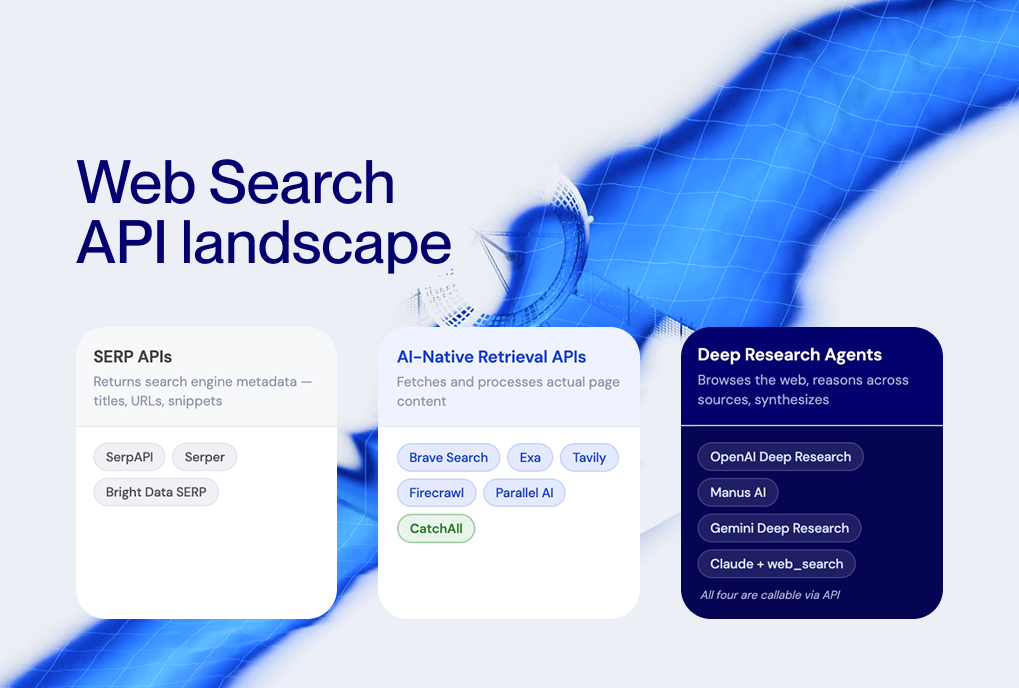
There are two primary tools for this: web scraping APIs and web search APIs.
A web scraping API pulls raw HTML from target websites, while web search APIs return pre-structured results from indexed content.
The choice between a web scraping API vs web search API depends on whether you need data from a specific URL or broad information from many sites.
In this article, we will explain the differences and outline the use cases to help you identify the most reliable web scraping API or search API for your needs.
Web Scraping API vs Web Search API: What Are the Key Differences?
A web scraping API extracts raw HTML or rendered DOM (Document Object Model) content from specific web pages. You provide it with a URL, and it returns the page’s content after handling things like proxies, CAPTCHA, and JavaScript. You then analyze that HTML to find the data you need.

On the other hand, a web search API takes a search query and returns structured results, including titles, links, snippets, metadata, and sometimes the full articles, all in JSON format.

Here is the table that summarizes the key differences:
Developers use web API scraping when they want data from a specific website that doesn’t have an API, like prices on an online store, property listings, or job ads from a career website. Using an API scraper gives them complete control over what data is collected and how.
They choose a search API to monitor topics, track events, or gather data from multiple sources at once. A live web search API removes the need for per-site parsers and delivers results ready to use in AI tools, dashboards, or databases.
When to Use a Web Scraping API?
Use a web scraping API to extract detailed data from specific websites with custom parsing. It lets you specify exactly which HTML elements to capture.
For instance, building a price comparison tool for Amazon or eBay requires a scraper to navigate their DOM structures.
Here are the most common scraping use cases:
- E-commerce Price Tracking: Monitoring specific SKU (Stock Keeping Unit) changes across competitor sites.
- Directory Extraction: Pulling contact information from sites like Yelp or LinkedIn.
- Financial Reporting: Scraping specific government or regulatory filing pages.
When you use the scraping API, you must be aware of the following limitations:
- Fragility: Scrapers break whenever the target site changes its HTML structure, CSS class names, or anti-bot measures. According to Proxyway’s Web Scraping API Report 2025, even the most reliable web scraping API services average 85–98% success rates, meaning 2–15% of requests fail.
- Proxy and anti-bot overhead: Modern websites deploy CAPTCHA, rate limiting, fingerprint detection, and JavaScript challenges. Scraping APIs handle much of this, but it increases cost and latency.
Engineering overhead: Every target site needs a custom parser. Maintaining parsers across dozens of sites becomes a dedicated engineering task.
When to Use a Web Search API?
A web search API is the go-to choice for monitoring broad topics, detecting real-time events, or gathering data from thousands of different sources in parallel.
Instead of building 500 different scrapers for 500 different news sites, you can use a single API call to find all mentions of a specific keyword. This approach is considerably faster for tasks like market intelligence and brand monitoring.
Typical search API use cases:
- Market intelligence. Track M&A (Mergers and Acquisitions)deals, funding rounds, product launches, and competitor moves across thousands of sources. A single API query replaces weeks of manual research.
- Brand and media monitoring. Monitor mentions of your brand, executives, or products across news outlets, blogs, and the open web in real time.
- M&A and regulatory tracking. Detect acquisitions, policy changes, FDA approvals, or security incidents as they happen, across every relevant source.
- News aggregation. Build custom news feeds filtered by topic, geography, language, and source type. Structured JSON output feeds directly into dashboards and alert systems.
AI and LLM grounding. Feed real-time, cited web data into RAG pipelines so your LLM generates answers grounded in current facts, not stale training data.
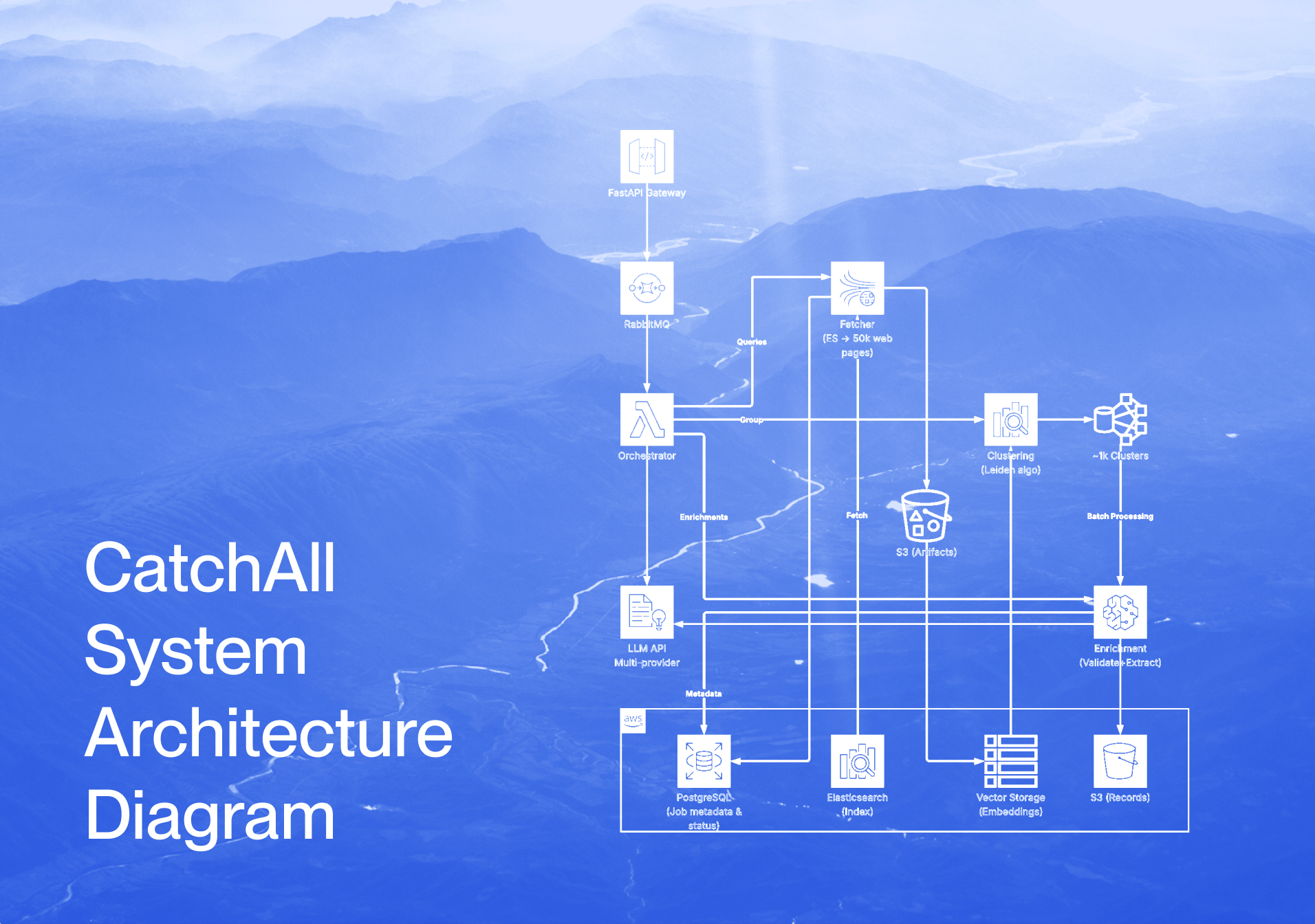
APIs like CatchAll by NewsCatcher are suitable for handling such scenarios. Unlike traditional search APIs that return the top 10 results, CatchAll processes 50,000+ web pages per query to find every relevant event.
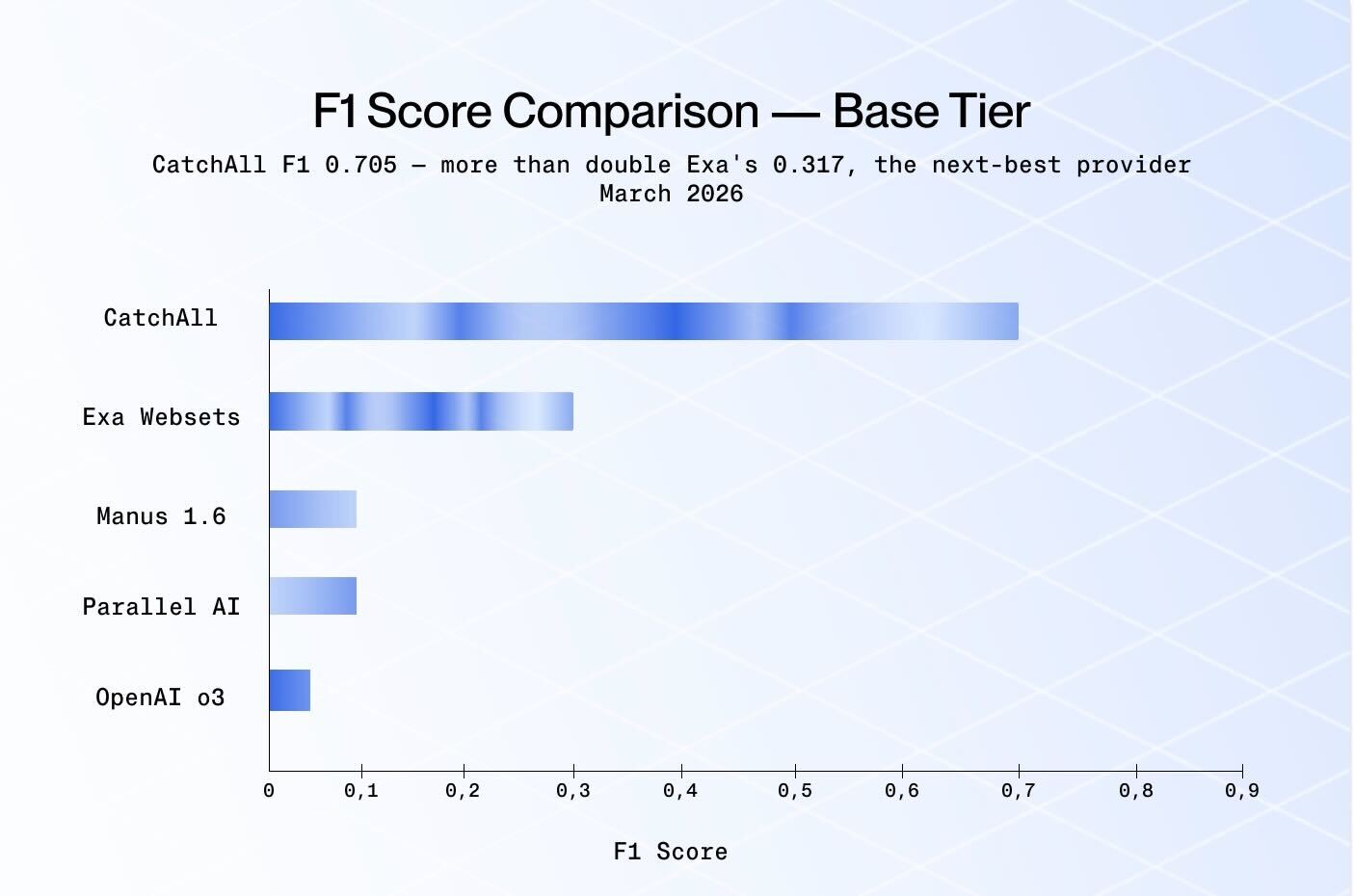
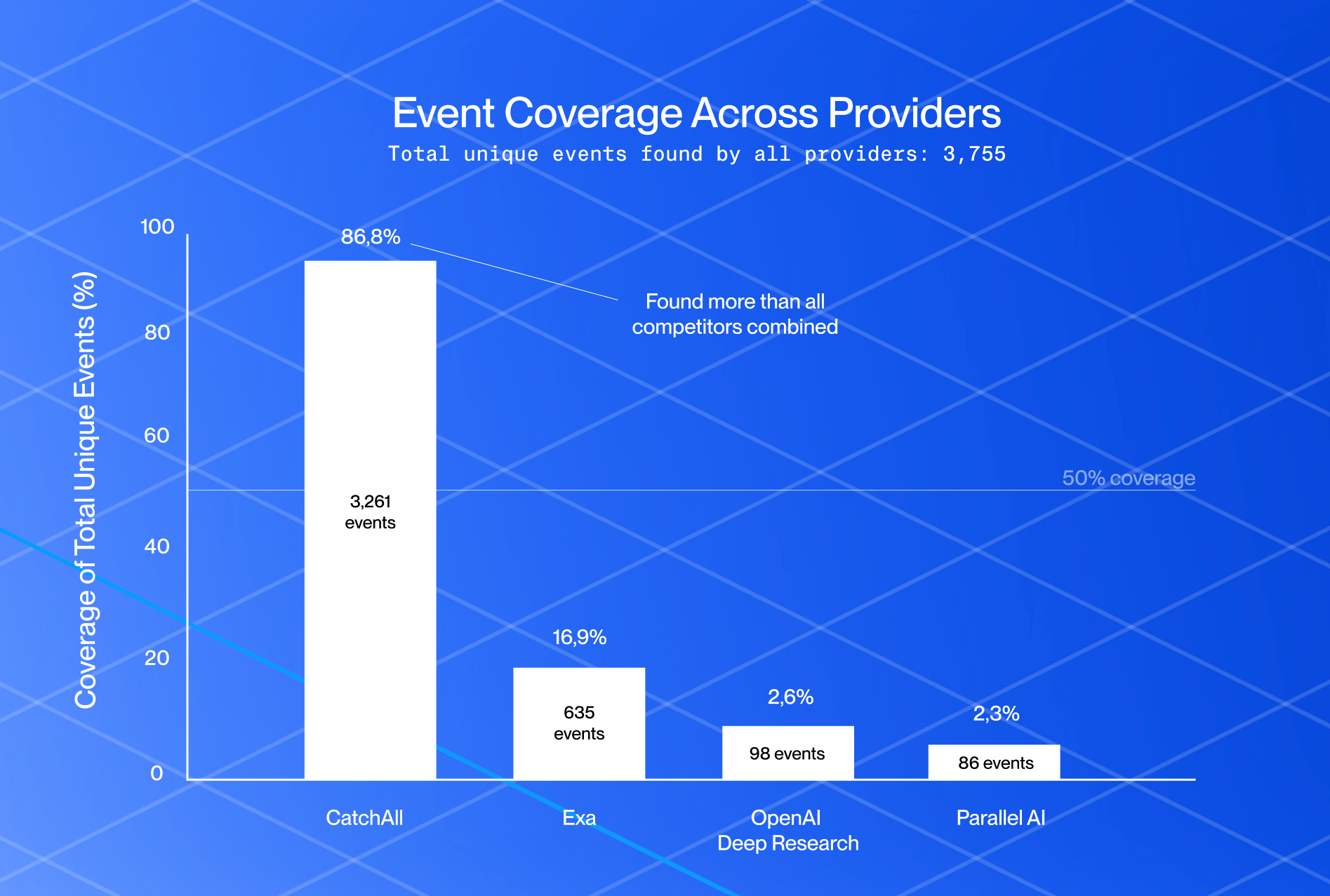
CatchAll removes the need for proxies, HTML parsing, and CAPTCHA handling entirely. According to NewsCatcher benchmarks for complex enterprise queries, it achieves 64.5% more true positives than Exa Websets, proving highly effective for large-scale, real-time event detection and monitoring.
What Are the Best Web Scraping APIs?
If your project still requires traditional scraping, you need a tool that can handle JavaScript rendering and proxy rotation automatically. These tools can bypass website defenses, serving as a bridge between your code and target data. Use the following best web scraping APIs for search data.
1. ScraperAPI
ScraperAPI is a general-purpose scraping service that returns raw HTML from any URL via a single API call. It manages a pool of 40M+ IPs with automatic rotation, CAPTCHA handling, and JavaScript rendering.
Key Features:
- Automatic proxy rotation across 50+ geolocations.
- JavaScript rendering for dynamic pages.
- Structured data endpoints for Amazon, Google, and Walmart.
Pricing: Starts at $49/month for 100,000 credits. Free tier available.
Best for: Small to mid-size projects with moderate anti-bot requirements.
2. Apify
Apify is a cloud automation platform with 19,000+ pre-built scrapers (Actors) that handle specific sites and workflows. It combines scraping, scheduling, storage, and integrations (Zapier, Make, n8n) in one platform.
Key Features:
- 19,000+ community and official Actors.
- Serverless hosting with built-in scheduling.
- Integrations with Zapier, Make, and vector databases.
Pricing: Free tier ($5/month credits). Starter $29/month. Scale $199/month.
Best for: Developers building multi-step automation pipelines.
3. Oxylabs Web Scraper API
Oxylabs provides an enterprise-grade scraping infrastructure with 100M+ IPs and a Web Scraper API offering AI-assisted data extraction (OxyCopilot). It charges by bandwidth rather than per request.
Key Features:
- 100M+ IPs across 195 countries.
- Bandwidth-based pricing (~$9.40/GB).
- AI-driven extraction via OxyCopilot.
Pricing: Custom enterprise pricing.
Best for: Large-scale enterprise data gathering with strict compliance needs.
What Are the Best Web Search APIs?
When broad discovery and structured output are your priorities, then use the following best web scraping APIs.
1. CatchAll
CatchAll is a SOTA recall-first web search API. It searches NewsCatcher’s proprietary index of 2B+ web pages and returns structured, deduplicated records of real-world events in real time.
Key Features:
- Processes 50,000+ pages per query for maximum recall.
- Graph-based clustering (Leiden algorithm) to deduplicate events.
- Structured JSON with dynamic extraction schemas.
- MCP server for direct AI agent integration.
Pricing: Starter $50/month (+6,000 credits). Scale $500/month (+60,000 credits).
Best for: Event detection, M&A tracking, regulatory monitoring, and AI grounding, and any developer needing a cleaner alternative to scraping.
2. SerpAPI
SerpAPI scrapes results from 40+ search engines (Google, Bing, Yahoo, YouTube, and more) and returns them as structured JSON. It handles SERP parsing, rich snippets, Knowledge Panels, and People Also Ask boxes.
Key Features:
- Supports 40+ search engines and SERP features.
- Structured JSON output with rich snippet parsing.
- $2M legal protection included on paid plans.
Pricing: Starts at $25/month (1,000 searches).
Best for: SEO teams, rank tracking, and SERP analysis.
3. Brave Search API
Brave operates an independent search index (it does not scrape Google or Bing). This makes it legally cleaner and not dependent on third-party infrastructure.
Key Features:
- Independent web index.
- Privacy-first: no user tracking or data sharing.
- Up to 20 results per page.
Pricing: $5/1,000 queries per month.
Best for: Privacy-focused applications and teams that want independence from Big Tech search infrastructure.
Web Scraping vs Web Search API — Which One Should You Choose?
The right tool depends on what you are building. If you know the exact URL and need every data point on that page, use a web scraping API. If you need to monitor the entire web for specific information, a web search API is the more efficient and scalable choice.
Here is a decision framework.
Choose a web scraping API if:
- You need the raw HTML for advanced processing.
- Your targets are a small set of known domains.
- You need custom parsing logic for non-standard data formats.
- You have the engineering capacity to maintain parsers as site layouts change.
Choose a Web Search API if:
- You need scalable, live data across millions of domains.
- You want structured JSON output without writing parsers.
- You are monitoring topics, events, or mentions across many sources.
- You are feeding data into AI models, RAG pipelines, or analytics dashboards.
For many modern workflows, especially those involving AI agents, market intelligence, and event monitoring, a web search API delivers better results with less engineering effort.
When scraping is the right fit, use it, but when your goal is broad, real-time coverage with structured output, a search API will save your team significant time and maintenance overhead.
Summary
Scraping offers precision and depth for specific targets but demands high maintenance and engineering resources. In contrast, search APIs deliver broad, structured data instantly across the web without the technical headaches of proxies and CAPTCHA.
For developers prioritizing event detection, discovery, and real-time monitoring, a web search API like CatchAll is the superior choice. You can focus on building your application and deriving insights rather than constantly fixing broken scrapers by choosing a search-based approach.
Get started with CatchAll for recall-first web search. Start with 2,000 free credits at platform.newscatcherapi.com — that’s 20 Lite queries or enough to explore Base across several topics.
Documentation: here
Questions? Reach us at support@newscatcherapi.com.
Further Reading: