

Jobs lifecycle
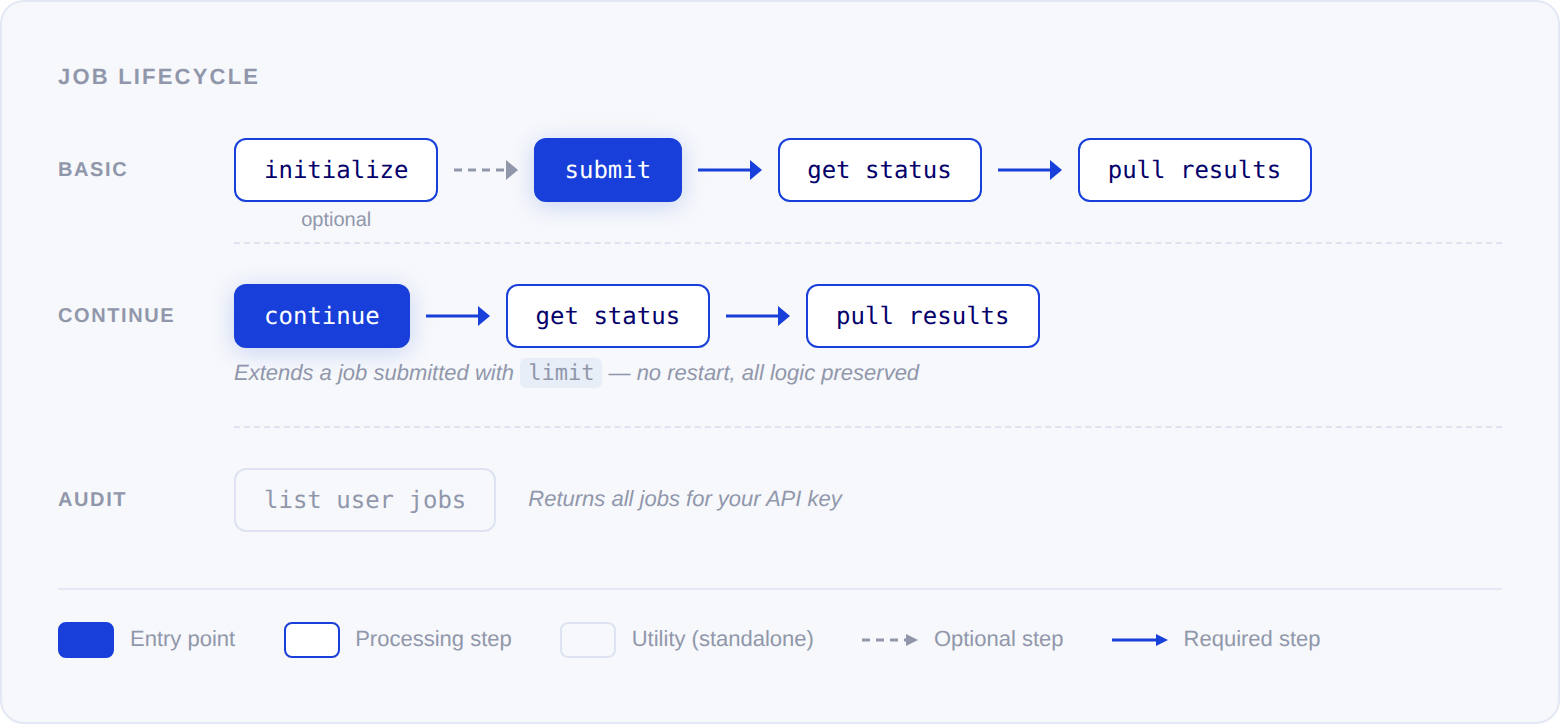
Initialize job
POST /catchAll/initialize
analyzes your query and returns LLM-generated suggestions for validators,
enrichments, and a date range. It does not create a job or start processing.
This endpoint is a preview — it shows you one example of what validators and
enrichments could look like for your query. Because the suggestions are
LLM-generated, they are not deterministic. If you call initialize and then
submit a job without passing any validators or enrichments, the system generates
them again from scratch and the results will differ from the initialize
response.
To use the initialize suggestions in your job, pass them explicitly in your
submit request. You can use them as-is, modify them, or write your own.
Create job
POST /catchAll/submit creates
the job and starts processing. Only query is required — all other parameters
are optional.
Validators and enrichments are independent. You can define one without the
other — for example, provide custom enrichments and let the system generate
validators, or define validators and let the system generate enrichments.
If you omit both, the system generates both from scratch based on your query.
A validator applies its criteria literally to the evidence in the record’s
citations. A record whose citations don’t support the criteria is dropped, rather
than passed through as a borderline match. Write validator descriptions as
checkable statements about the source text — if you need a broader net, loosen
the description instead of relying on ambiguous cases passing.
To activate Company search mode and filter results to specific companies,
add
connected_dataset_ids to your submit request. See Company
Monitors for setup
instructions.To restrict fetching to a curated set of trusted domains, add
source_groups
with the slugs of the groups you want. See Source
groups.Get job status
GET /catchAll/status/{job_id}
returns the current processing stage. Poll every 30-60 seconds until status is
completed. Jobs typically take 10-15 minutes.
Jobs progress through these stages in order. A job can repeat fetching,
clustering, and enriching when it moves to a new search turn.
You can pull partial results once the job reaches the
enriching stage
without waiting for completion. See Get job results below.Search turns
CatchAll searches in up to four turns. The first turn runs a strict precision search that matches your query against article titles and summaries. If the job runs out of candidates before reaching itslimit, it moves to the next turn,
which searches a broader set of sources and repeats fetching, clustering,
and enriching. The job completes when it reaches the limit or finishes the
last turn. Jobs without a limit can run all four turns.
Because of this, a job can return to fetching after enriching. Treat this
as continued progress on the same job, and keep polling until the status is
completed or failed. Records from earlier turns keep their IDs; articles
found in later turns can be added to them as new citations.
To see which turn a job is on, read job_info.turn from the
status, results, or
list user jobs response. Turns are numbered from 1. Jobs
that run without turns report turn: 1.
Get job results
GET /catchAll/pull/{job_id}
retrieves structured records. During the enriching stage, progress_validated
tracks how many candidate clusters have been processed so far.
Fields of type
company (like investee_company and investor_company in
the example above) return a structured object with confidence scores for entity
identification and domain resolution. See the Company enrichment data model.Records from Company Search jobs include a
connected_entities array with
one entry per matched company — each with entity_id, name, ed_score
(1–10), and relation. See Company search
for the full output format.Export results as CSV
To pull results in a spreadsheet-friendly format, useGET /catchAll/pull/{job_id}/csv.
It returns the job’s records as a text/csv download instead of JSON.
citations are serialized as a JSON column. For event monitors, the equivalent
endpoint is
GET /catchAll/monitors/pull/{monitor_id}/csv,
which exports the most recent run’s records.
Connected entities from Company Search jobs are split into two JSON columns:
event_associated_entities (direct actors) and mention_entities (passing
references). These two columns appear only when the job used a connected entity
dataset — if it did not, they are omitted from the export entirely rather than
included as empty columns.
Continue job
To process more records after reviewing the initial results of a job submitted with alimit, use POST /catchAll/continue.
It extends the limit without restarting the job — all analysis, validation, and
enrichment logic from the original job is preserved.
Before continuing, check candidate_records and progress_validated in the pull
response to estimate how much data remains. candidate_records is the total number
of event clusters found, progress_validated is how many have been checked so far.
The difference tells you roughly how many candidates are still unprocessed — note
that hit rate is not linear, so the number of new valid records per continuation may vary.
List user jobs
GET /catchAll/jobs/user
returns all jobs created with your API key, sorted by creation date, most recent
first. Supports pagination via page and page_size, text query filtering via
search, ownership filtering via ownership (all, own, shared), project
filtering via project_id, and processing mode filtering via mode.
Filter by processing mode
Passmode=base or mode=lite to return only jobs that ran in that mode —
useful for separating full-pipeline runs from faster lite runs when reviewing
history. Omit mode to list jobs in both modes. Each job in the response carries
its own mode field.
cURL
Delete a job
DELETE /catchAll/jobs/{job_id}
soft-deletes a job. The job is flagged as deleted and no longer appears in list
results. Deletion is idempotent — deleting an already-deleted job returns 200.