> ## Documentation Index
> Fetch the complete documentation index at: https://newscatcherinc-docs.mintlify.site/docs/llms.txt
> Use this file to discover all available pages before exploring further.
# CatchAll Skills
> Give any AI agent specialized, task-specific capabilities for web data extraction — from general-purpose search to competitive intelligence, funding, and M&A tracking.
CatchAll Skills are Markdown instruction files that give an AI agent a
specialized capability on top of the CatchAll MCP server. Each
skill knows how to write the right queries, which validators to apply, and how
to format output for its specific use case — with no extra coding or middleware
required.
Skills are **platform-agnostic**: they work with Claude (claude.ai, Claude
Desktop, Claude Code), OpenAI Assistants, LangChain agents, and any agent
runtime that supports Markdown-based instructions.
## How it works
A skill file is a Markdown document the agent reads as instructions. When the
agent is connected to the [CatchAll MCP server](/web-search-api/integrations/mcp)
(the preferred path for MCP-based skills), it uses the skill to decide which
MCP tool to call, how to construct queries, and how to present results — no
additional tooling required.
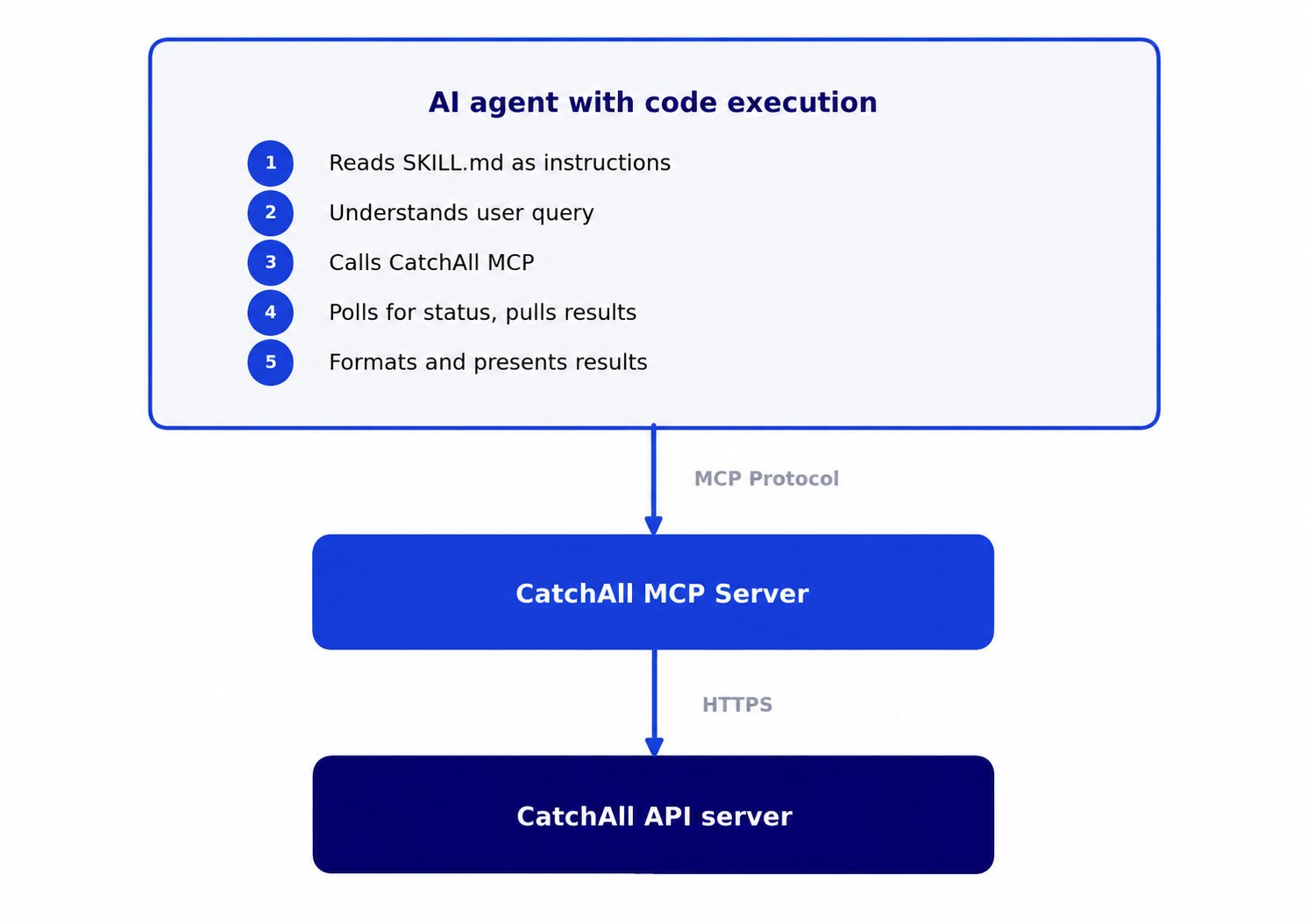 Most skills in this repository use the **MCP interface**: the agent calls the
CatchAll MCP server via MCP tools, and the skill provides the judgment layer —
query construction rules, validator patterns, enrichment schemas, and output
formatting. For Claude-specific MCP setup, see the
[Claude integration](/web-search-api/integrations/claude) page.
## Before you start
* A **CatchAll API key** from
[platform.newscatcherapi.com](https://platform.newscatcherapi.com)
* The **CatchAll MCP server** connected to your agent — see the
[MCP integration](/web-search-api/integrations/mcp) page for setup
instructions
* An AI agent with Markdown instruction support (Claude, an OpenAI Assistant,
a LangChain agent, or any custom runtime with a configurable system prompt)
## Set up
How you load a skill depends on your agent platform. The core requirement is
the same: the agent must be able to read the skill's `SKILL.md` and its
reference files, and have access to your API key.
**Claude Code and Claude Desktop** — copy the skill folder into your
project's `.claude/skills/` directory, or reference the folder path
directly when starting a conversation.
```bash theme={null}
# Clone the repository
git clone https://github.com/Newscatcher/newscatcher-catchall-integrations.git
# Copy your chosen skill into your project
cp -r newscatcher-catchall-integrations/skills/fundraising-catchall .claude/skills/
```
**Claude.ai** — zip the skill folder and upload it via the Skills feature
at [claude.ai/customize/skills](https://claude.ai/customize/skills).
```bash theme={null}
# Create a zip from the skill folder
cd newscatcher-catchall-integrations/skills
zip -r fundraising-catchall.zip fundraising-catchall/
```
Upload the `.zip` via **+** → **Upload a skill** on the Skills page.
All MCP-based skills require the CatchAll MCP server to be connected.
Add it from [platform.newscatcherapi.com](https://platform.newscatcherapi.com)
or follow the [MCP integration](/web-search-api/integrations/mcp) setup
guide before activating a skill.
Load `SKILL.md` as the system prompt in your agent framework, then
configure the CatchAll MCP server or REST API as a tool.
```python theme={null}
from pathlib import Path
skill_prompt = Path("skills/fundraising-catchall/SKILL.md").read_text()
# Use as system prompt with any LLM SDK
messages = [
{"role": "system", "content": skill_prompt},
{"role": "user", "content": "Find AI startups that raised seed funding in Europe last 30 days"}
]
```
The agent needs access to the CatchAll MCP server or REST API. MCP-based
skills call tools like `submit_query`, `get_job_status`, and
`pull_results` — make sure those are exposed as callable tools in your
agent setup.
***
## Skills
Browse the available skills below. Each one is a self-contained folder in the
[integrations repository](https://github.com/Newscatcher/newscatcher-catchall-integrations/tree/main/skills).
***
### General Use Case
The foundation skill for the full CatchAll platform surface. Use it for any
task not covered by a dedicated skill — or when the user needs direct control
over validators, enrichments, watchlists, webhooks, or delivery setup.
**Main use case:** Search, extract, and monitor any real-world event
from the web — jobs, recurring monitors, Slack alerts, company watchlists, and
more — without writing a single API call.
**Interface:** MCP (`https://catchall-mcp.newscatcherapi.com/mcp`) · **Folder:**
[`skills/general-use-case`](https://github.com/Newscatcher/newscatcher-catchall-integrations/tree/main/skills/general-use-case)
| File | Purpose |
| ---------------------------------- | ----------------------------------------------------------------------------------------------------------------------------------------------------------------------------------------------------------------------------------------------------------------------- |
| `SKILL.md` | Core skill: query construction rules, full MCP tool reference (jobs, monitors, webhooks, datasets, entities, projects), job modes (`base` / `lite`), limit vs. page\_size distinction, watchlist mode end-to-end workflow, full automation sequence, edge case handling |
| `references/VALIDATORS.md` | How to write effective boolean filters, cost control, the validators-vs-date-range distinction, and common validator patterns |
| `references/MONITOR-SCHEDULING.md` | Natural language schedule formats, timezone handling, and webhook configuration examples for recurring monitors |
**Example prompts**
> Find EU regulatory fines on Big Tech companies in the last 30 days, limit 20.
> Set up a weekly Slack alert every Monday at 9 AM UTC for new AI model
> releases.
> Track these 10 competitors and alert me whenever any of them raises funding.
> How many credits do I have left?
***
### Competitor Snapshot
Produces a structured digest of a competitor's recent moves across the
categories competitive intelligence teams actually use: product launches,
pricing changes, leadership moves, customer wins, partnerships, M\&A activity,
and financial signals. Works on a single competitor or a watchlist of up to
100 companies.
**Main use case:** Get a complete, structured picture of what a named company
— or a list of companies — has been doing recently, across seven intelligence
categories, without manually scanning dozens of sources.
**Interface:** MCP (`https://catchall-mcp.newscatcherapi.com/mcp`) · **Folder:**
[`skills/competitor-snapshot-catchall`](https://github.com/Newscatcher/newscatcher-catchall-integrations/tree/main/skills/competitor-snapshot-catchall)
| File | Purpose |
| --------------------------------- | ----------------------------------------------------------------------------------------------------------------------------------------------------------------------------------------------------- |
| `SKILL.md` | Core skill: seven intelligence buckets with their enrichment schemas, watchlist execution path, single-competitor and multi-competitor output templates, "events worth watching" cross-bucket section |
| `references/QUERY-REVIEW.md` | Pre-run intake rules: scope confirmation, cost gates, timeframe defaults |
| `references/JOB-LIFECYCLE.md` | Polling rules, progress table format, completion detection, 90-minute run cap |
| `references/OUTPUT-REPORT.md` | Output file contracts: xlsx workbook, JSON, and CSV schemas, table conventions, zero-event patterns |
| `references/NEXT-STEPS.md` | Footer links and follow-up actions rendered at the end of every snapshot |
| `references/CONCURRENCY.md` | Concurrency wave cadence for submitting multiple jobs in parallel |
| `references/COMPANY-WATCHLIST.md` | Full watchlist mechanics: CSV build, domain handling, dataset upload, connected submit, result attribution by `ed_score` |
**Example prompts**
> Snapshot Atlassian over the last 30 days.
> What's Salesforce been up to this month?
> Give me a competitive brief on Notion, Linear, and Jira for the last 14 days.
***
### Fundraising
Finds confirmed funding announcements across any geography, stage, and industry vertical.
Returns structured event records, not raw links or article summaries.
**Main use case:** Build prospect lists, track deal flow, or monitor market
activity around funding rounds — driven by structured event extraction, not
keyword search.
**Interface:** MCP (`https://catchall-mcp.newscatcherapi.com/mcp`) · **Folder:**
[`skills/fundraising-catchall`](https://github.com/Newscatcher/newscatcher-catchall-integrations/tree/main/skills/fundraising-catchall)
| File | Purpose |
| -------------------------------- | ---------------------------------------------------------------------------------------------------------------------------------------------------------------------------------------------------------------------------------------- |
| `SKILL.md` | Core skill: funding query formula, 4 standard validators, full enrichment schema (company name, round, amount split into value/currency/display, investors, location, industry, product description), extraction rules, limit heuristics |
| `references/JOB-LIFECYCLE.md` | Polling rules, progress tracking, completion detection |
| `references/OUTPUT-ARTIFACTS.md` | Output file contracts: xlsx, JSON, and CSV schemas, chat table column order |
| `references/OUTPUT-LIST.md` | Column definitions and field vocabulary for the output list |
| `references/QUERY-REVIEW.md` | Pre-run intake rules: scope confirmation, cost gates, timeframe defaults |
| `references/NEXT-STEPS.md` | Footer links and follow-up actions rendered after every run |
| `scripts/build_downloads.py` | Generates xlsx, JSON, and CSV download files from job results |
**Example prompts**
> Series B raises in Austin last 30 days.
> Which AI startups raised seed funding in Europe this month?
> Find all funding rounds over \$50M in the US in the last 30 days.
> Who got funded in fintech globally last 2 weeks?
***
### Mergers & Acquisitions
Finds confirmed M\&A deals — acquisitions, mergers, asset purchases, and
acqui-hires — across any geography and industry. Returns structured event
records with deal type, both parties, deal value where disclosed, and deal
status.
**Main use case:** Track deal activity for competitive intelligence, GTM
targeting of recently-acquired companies, or ongoing market monitoring — all
from a single natural language query.
**Interface:** MCP (`https://catchall-mcp.newscatcherapi.com/mcp`) · **Folder:**
[`skills/m&a-catchall`](https://github.com/Newscatcher/newscatcher-catchall-integrations/tree/main/skills/m%26a-catchall)
| File | Purpose |
| -------------------------------- | ------------------------------------------------------------------------------------------------------------------------------------------------------------------------------------------------------------------------------------------------------------------------------------------------------- |
| `SKILL.md` | Core skill: M\&A query formula, 5 standard validators, full enrichment schema (acquirer, target, deal value split into value/currency/display, deal type normalized and display, deal status, deal rationale), extraction rules, acquirer type taxonomy (`big_tech`, `strategic`, `financial`, `other`) |
| `references/JOB-LIFECYCLE.md` | Polling rules, progress tracking, completion detection |
| `references/OUTPUT-ARTIFACTS.md` | Output file contracts: xlsx, JSON, and CSV schemas, chat table column order |
| `references/OUTPUT-LIST.md` | Column definitions and field vocabulary for the output list |
| `references/QUERY-REVIEW.md` | Pre-run intake rules: scope confirmation, cost gates, timeframe defaults |
| `references/NEXT-STEPS.md` | Footer links and follow-up actions rendered after every run |
| `scripts/build_downloads.py` | Generates xlsx, JSON, and CSV download files from job results |
**Example prompts**
> AI companies acquired in the US last 30 days.
> Fintech mergers announced in Europe this month.
> Which healthtech startups were acquired in the last 14 days?
> PE acquisitions in enterprise SaaS globally last 30 days.
***
### VC Pack
Combines funding and M\&A activity into a single interactive dashboard for a
given market segment. Runs two parallel CatchAll jobs — one for funding rounds,
one for acquisitions — and renders them together with aggregated KPIs, deal
stage breakdowns, sub-sector distribution, and live FX conversion.
**Main use case:** Get a complete capital flow view of a market in one run —
where money is entering (funding) and where ownership is consolidating (M\&A)
— without manually combining two separate reports.
**Interface:** MCP (`https://catchall-mcp.newscatcherapi.com/mcp`) · **Folder:**
[`skills/vc-pack-catchall`](https://github.com/Newscatcher/newscatcher-catchall-integrations/tree/main/skills/vc-pack-catchall)
| File | Purpose |
| ----------------------------- | ----------------------------------------------------------------------------------------------------------------------------------------------------------------------------------------------------- |
| `SKILL.md` | Core skill: two-feed parallel submit, polling both jobs to completion, three-tier dashboard rendering (inline widget, file delivery, or markdown fallback), partial-render flow when one feed is slow |
| `assets/render.py` | Dashboard generator: aggregates both feeds, converts currencies via live FX, computes KPIs and deal stage breakdowns, produces the HTML dashboard and xlsx/JSON/CSV downloads |
| `assets/dashboard.html` | HTML template used by `render.py` |
| `references/EXTRACTION.md` | Query formulas, validators, and full enrichment schemas for both the funding and M\&A feeds |
| `references/JOB-LIFECYCLE.md` | Polling rules, progress tracking, completion detection |
| `references/NEXT-STEPS.md` | Footer links and follow-up actions rendered after every dashboard |
| `references/CONCURRENCY.md` | Concurrency wave cadence for submitting the two parallel jobs |
| `references/QUERY-REVIEW.md` | Pre-run intake rules: scope confirmation, cost gates, timeframe defaults |
| `scripts/render.py` | Standalone script version of the dashboard generator for non-MCP environments |
**Example prompts**
> VC pack for fintech last 30 days.
> Funding and M\&A in cybersecurity US last 2 weeks.
> Capital activity in healthcare AI this month.
> Where is money moving in climate tech globally?
## Have another use case in mind?
Feel free to share it [margaretha@newscatcherapi.com](mailto:margaretha@newscatcherapi.com) and we will build it for you!
***
## See also
Get better results from CatchAll jobs
Full endpoint documentation
MCP server setup and Python agent examples for Claude
All skills and reference files on GitHub
Most skills in this repository use the **MCP interface**: the agent calls the
CatchAll MCP server via MCP tools, and the skill provides the judgment layer —
query construction rules, validator patterns, enrichment schemas, and output
formatting. For Claude-specific MCP setup, see the
[Claude integration](/web-search-api/integrations/claude) page.
## Before you start
* A **CatchAll API key** from
[platform.newscatcherapi.com](https://platform.newscatcherapi.com)
* The **CatchAll MCP server** connected to your agent — see the
[MCP integration](/web-search-api/integrations/mcp) page for setup
instructions
* An AI agent with Markdown instruction support (Claude, an OpenAI Assistant,
a LangChain agent, or any custom runtime with a configurable system prompt)
## Set up
How you load a skill depends on your agent platform. The core requirement is
the same: the agent must be able to read the skill's `SKILL.md` and its
reference files, and have access to your API key.
**Claude Code and Claude Desktop** — copy the skill folder into your
project's `.claude/skills/` directory, or reference the folder path
directly when starting a conversation.
```bash theme={null}
# Clone the repository
git clone https://github.com/Newscatcher/newscatcher-catchall-integrations.git
# Copy your chosen skill into your project
cp -r newscatcher-catchall-integrations/skills/fundraising-catchall .claude/skills/
```
**Claude.ai** — zip the skill folder and upload it via the Skills feature
at [claude.ai/customize/skills](https://claude.ai/customize/skills).
```bash theme={null}
# Create a zip from the skill folder
cd newscatcher-catchall-integrations/skills
zip -r fundraising-catchall.zip fundraising-catchall/
```
Upload the `.zip` via **+** → **Upload a skill** on the Skills page.
All MCP-based skills require the CatchAll MCP server to be connected.
Add it from [platform.newscatcherapi.com](https://platform.newscatcherapi.com)
or follow the [MCP integration](/web-search-api/integrations/mcp) setup
guide before activating a skill.
Load `SKILL.md` as the system prompt in your agent framework, then
configure the CatchAll MCP server or REST API as a tool.
```python theme={null}
from pathlib import Path
skill_prompt = Path("skills/fundraising-catchall/SKILL.md").read_text()
# Use as system prompt with any LLM SDK
messages = [
{"role": "system", "content": skill_prompt},
{"role": "user", "content": "Find AI startups that raised seed funding in Europe last 30 days"}
]
```
The agent needs access to the CatchAll MCP server or REST API. MCP-based
skills call tools like `submit_query`, `get_job_status`, and
`pull_results` — make sure those are exposed as callable tools in your
agent setup.
***
## Skills
Browse the available skills below. Each one is a self-contained folder in the
[integrations repository](https://github.com/Newscatcher/newscatcher-catchall-integrations/tree/main/skills).
***
### General Use Case
The foundation skill for the full CatchAll platform surface. Use it for any
task not covered by a dedicated skill — or when the user needs direct control
over validators, enrichments, watchlists, webhooks, or delivery setup.
**Main use case:** Search, extract, and monitor any real-world event
from the web — jobs, recurring monitors, Slack alerts, company watchlists, and
more — without writing a single API call.
**Interface:** MCP (`https://catchall-mcp.newscatcherapi.com/mcp`) · **Folder:**
[`skills/general-use-case`](https://github.com/Newscatcher/newscatcher-catchall-integrations/tree/main/skills/general-use-case)
| File | Purpose |
| ---------------------------------- | ----------------------------------------------------------------------------------------------------------------------------------------------------------------------------------------------------------------------------------------------------------------------- |
| `SKILL.md` | Core skill: query construction rules, full MCP tool reference (jobs, monitors, webhooks, datasets, entities, projects), job modes (`base` / `lite`), limit vs. page\_size distinction, watchlist mode end-to-end workflow, full automation sequence, edge case handling |
| `references/VALIDATORS.md` | How to write effective boolean filters, cost control, the validators-vs-date-range distinction, and common validator patterns |
| `references/MONITOR-SCHEDULING.md` | Natural language schedule formats, timezone handling, and webhook configuration examples for recurring monitors |
**Example prompts**
> Find EU regulatory fines on Big Tech companies in the last 30 days, limit 20.
> Set up a weekly Slack alert every Monday at 9 AM UTC for new AI model
> releases.
> Track these 10 competitors and alert me whenever any of them raises funding.
> How many credits do I have left?
***
### Competitor Snapshot
Produces a structured digest of a competitor's recent moves across the
categories competitive intelligence teams actually use: product launches,
pricing changes, leadership moves, customer wins, partnerships, M\&A activity,
and financial signals. Works on a single competitor or a watchlist of up to
100 companies.
**Main use case:** Get a complete, structured picture of what a named company
— or a list of companies — has been doing recently, across seven intelligence
categories, without manually scanning dozens of sources.
**Interface:** MCP (`https://catchall-mcp.newscatcherapi.com/mcp`) · **Folder:**
[`skills/competitor-snapshot-catchall`](https://github.com/Newscatcher/newscatcher-catchall-integrations/tree/main/skills/competitor-snapshot-catchall)
| File | Purpose |
| --------------------------------- | ----------------------------------------------------------------------------------------------------------------------------------------------------------------------------------------------------- |
| `SKILL.md` | Core skill: seven intelligence buckets with their enrichment schemas, watchlist execution path, single-competitor and multi-competitor output templates, "events worth watching" cross-bucket section |
| `references/QUERY-REVIEW.md` | Pre-run intake rules: scope confirmation, cost gates, timeframe defaults |
| `references/JOB-LIFECYCLE.md` | Polling rules, progress table format, completion detection, 90-minute run cap |
| `references/OUTPUT-REPORT.md` | Output file contracts: xlsx workbook, JSON, and CSV schemas, table conventions, zero-event patterns |
| `references/NEXT-STEPS.md` | Footer links and follow-up actions rendered at the end of every snapshot |
| `references/CONCURRENCY.md` | Concurrency wave cadence for submitting multiple jobs in parallel |
| `references/COMPANY-WATCHLIST.md` | Full watchlist mechanics: CSV build, domain handling, dataset upload, connected submit, result attribution by `ed_score` |
**Example prompts**
> Snapshot Atlassian over the last 30 days.
> What's Salesforce been up to this month?
> Give me a competitive brief on Notion, Linear, and Jira for the last 14 days.
***
### Fundraising
Finds confirmed funding announcements across any geography, stage, and industry vertical.
Returns structured event records, not raw links or article summaries.
**Main use case:** Build prospect lists, track deal flow, or monitor market
activity around funding rounds — driven by structured event extraction, not
keyword search.
**Interface:** MCP (`https://catchall-mcp.newscatcherapi.com/mcp`) · **Folder:**
[`skills/fundraising-catchall`](https://github.com/Newscatcher/newscatcher-catchall-integrations/tree/main/skills/fundraising-catchall)
| File | Purpose |
| -------------------------------- | ---------------------------------------------------------------------------------------------------------------------------------------------------------------------------------------------------------------------------------------- |
| `SKILL.md` | Core skill: funding query formula, 4 standard validators, full enrichment schema (company name, round, amount split into value/currency/display, investors, location, industry, product description), extraction rules, limit heuristics |
| `references/JOB-LIFECYCLE.md` | Polling rules, progress tracking, completion detection |
| `references/OUTPUT-ARTIFACTS.md` | Output file contracts: xlsx, JSON, and CSV schemas, chat table column order |
| `references/OUTPUT-LIST.md` | Column definitions and field vocabulary for the output list |
| `references/QUERY-REVIEW.md` | Pre-run intake rules: scope confirmation, cost gates, timeframe defaults |
| `references/NEXT-STEPS.md` | Footer links and follow-up actions rendered after every run |
| `scripts/build_downloads.py` | Generates xlsx, JSON, and CSV download files from job results |
**Example prompts**
> Series B raises in Austin last 30 days.
> Which AI startups raised seed funding in Europe this month?
> Find all funding rounds over \$50M in the US in the last 30 days.
> Who got funded in fintech globally last 2 weeks?
***
### Mergers & Acquisitions
Finds confirmed M\&A deals — acquisitions, mergers, asset purchases, and
acqui-hires — across any geography and industry. Returns structured event
records with deal type, both parties, deal value where disclosed, and deal
status.
**Main use case:** Track deal activity for competitive intelligence, GTM
targeting of recently-acquired companies, or ongoing market monitoring — all
from a single natural language query.
**Interface:** MCP (`https://catchall-mcp.newscatcherapi.com/mcp`) · **Folder:**
[`skills/m&a-catchall`](https://github.com/Newscatcher/newscatcher-catchall-integrations/tree/main/skills/m%26a-catchall)
| File | Purpose |
| -------------------------------- | ------------------------------------------------------------------------------------------------------------------------------------------------------------------------------------------------------------------------------------------------------------------------------------------------------- |
| `SKILL.md` | Core skill: M\&A query formula, 5 standard validators, full enrichment schema (acquirer, target, deal value split into value/currency/display, deal type normalized and display, deal status, deal rationale), extraction rules, acquirer type taxonomy (`big_tech`, `strategic`, `financial`, `other`) |
| `references/JOB-LIFECYCLE.md` | Polling rules, progress tracking, completion detection |
| `references/OUTPUT-ARTIFACTS.md` | Output file contracts: xlsx, JSON, and CSV schemas, chat table column order |
| `references/OUTPUT-LIST.md` | Column definitions and field vocabulary for the output list |
| `references/QUERY-REVIEW.md` | Pre-run intake rules: scope confirmation, cost gates, timeframe defaults |
| `references/NEXT-STEPS.md` | Footer links and follow-up actions rendered after every run |
| `scripts/build_downloads.py` | Generates xlsx, JSON, and CSV download files from job results |
**Example prompts**
> AI companies acquired in the US last 30 days.
> Fintech mergers announced in Europe this month.
> Which healthtech startups were acquired in the last 14 days?
> PE acquisitions in enterprise SaaS globally last 30 days.
***
### VC Pack
Combines funding and M\&A activity into a single interactive dashboard for a
given market segment. Runs two parallel CatchAll jobs — one for funding rounds,
one for acquisitions — and renders them together with aggregated KPIs, deal
stage breakdowns, sub-sector distribution, and live FX conversion.
**Main use case:** Get a complete capital flow view of a market in one run —
where money is entering (funding) and where ownership is consolidating (M\&A)
— without manually combining two separate reports.
**Interface:** MCP (`https://catchall-mcp.newscatcherapi.com/mcp`) · **Folder:**
[`skills/vc-pack-catchall`](https://github.com/Newscatcher/newscatcher-catchall-integrations/tree/main/skills/vc-pack-catchall)
| File | Purpose |
| ----------------------------- | ----------------------------------------------------------------------------------------------------------------------------------------------------------------------------------------------------- |
| `SKILL.md` | Core skill: two-feed parallel submit, polling both jobs to completion, three-tier dashboard rendering (inline widget, file delivery, or markdown fallback), partial-render flow when one feed is slow |
| `assets/render.py` | Dashboard generator: aggregates both feeds, converts currencies via live FX, computes KPIs and deal stage breakdowns, produces the HTML dashboard and xlsx/JSON/CSV downloads |
| `assets/dashboard.html` | HTML template used by `render.py` |
| `references/EXTRACTION.md` | Query formulas, validators, and full enrichment schemas for both the funding and M\&A feeds |
| `references/JOB-LIFECYCLE.md` | Polling rules, progress tracking, completion detection |
| `references/NEXT-STEPS.md` | Footer links and follow-up actions rendered after every dashboard |
| `references/CONCURRENCY.md` | Concurrency wave cadence for submitting the two parallel jobs |
| `references/QUERY-REVIEW.md` | Pre-run intake rules: scope confirmation, cost gates, timeframe defaults |
| `scripts/render.py` | Standalone script version of the dashboard generator for non-MCP environments |
**Example prompts**
> VC pack for fintech last 30 days.
> Funding and M\&A in cybersecurity US last 2 weeks.
> Capital activity in healthcare AI this month.
> Where is money moving in climate tech globally?
## Have another use case in mind?
Feel free to share it [margaretha@newscatcherapi.com](mailto:margaretha@newscatcherapi.com) and we will build it for you!
***
## See also
Get better results from CatchAll jobs
Full endpoint documentation
MCP server setup and Python agent examples for Claude
All skills and reference files on GitHub