> ## Documentation Index
> Fetch the complete documentation index at: https://newscatcherinc-docs.mintlify.site/docs/llms.txt
> Use this file to discover all available pages before exploring further.
# n8n Integration
> Use CatchAll in your n8n automations
Use the CatchAll community node to integrate CatchAll API into your n8n workflows.
CatchAll is a [verified integration on n8n](https://n8n.io/integrations/newscatcher-catchall/).
## Before you start
Before you begin, make sure you have:
* n8n instance (Cloud or self-hosted)
* CatchAll API key (obtain from
[platform.newscatcherapi.com](https://platform.newscatcherapi.com))
## Install community node
In any workflow, click **`+`** or press **Tab** to open the nodes panel.
In the search field, type "Newscatcher CatchAll".
Click on the **Newscatcher CatchAll** node that appears in search results, then click **Install**.
Installation takes a few seconds. Once complete, the node is available to add to your workflows.
If the node doesn't appear in search, it may not yet be available on Cloud. Use a [self-hosted n8n instance](https://docs.n8n.io/hosting/installation/) as an alternative.
In your self-hosted n8n instance, go to **Settings > Community nodes**.
Click **Install a community node** and enter package details:
* **npm Package Name**: `n8n-nodes-newscatcher-catchall-pernode`.
* Check: "I understand the risks of installing unverified code from a public source".
* Click **Install.**
Installation takes a few seconds. Once complete, the node is available to add to your workflows.
## Configure API key
Enter your API key directly in each node's **API Key** field. There is no shared
credentials dropdown.
In the nodes panel, search for "Newscatcher CatchAll" and add it to your workflow.
In the **Parameters** tab, paste your CatchAll API key into the **API Key** field.
## Available operations
The CatchAll node supports three operations:
| Operation | Description | Endpoint |
| --------- | ------------------------------ | --------------------------- |
| `Submit` | Create a new CatchAll job | `/catchAll/submit ` |
| `Status` | Check job processing progress | `/catchAll/status/{job_id}` |
| `Pull` | Retrieve completed job results | `/catchAll/pull/{job_id}` |
Monitor operations and other advanced features are not available in the
community node. Use the CatchAll API directly via HTTP Request nodes for
monitor functionality.
## Create your first workflow
This workflow submits a CatchAll job, polls until completion, retrieves
results and send an email.
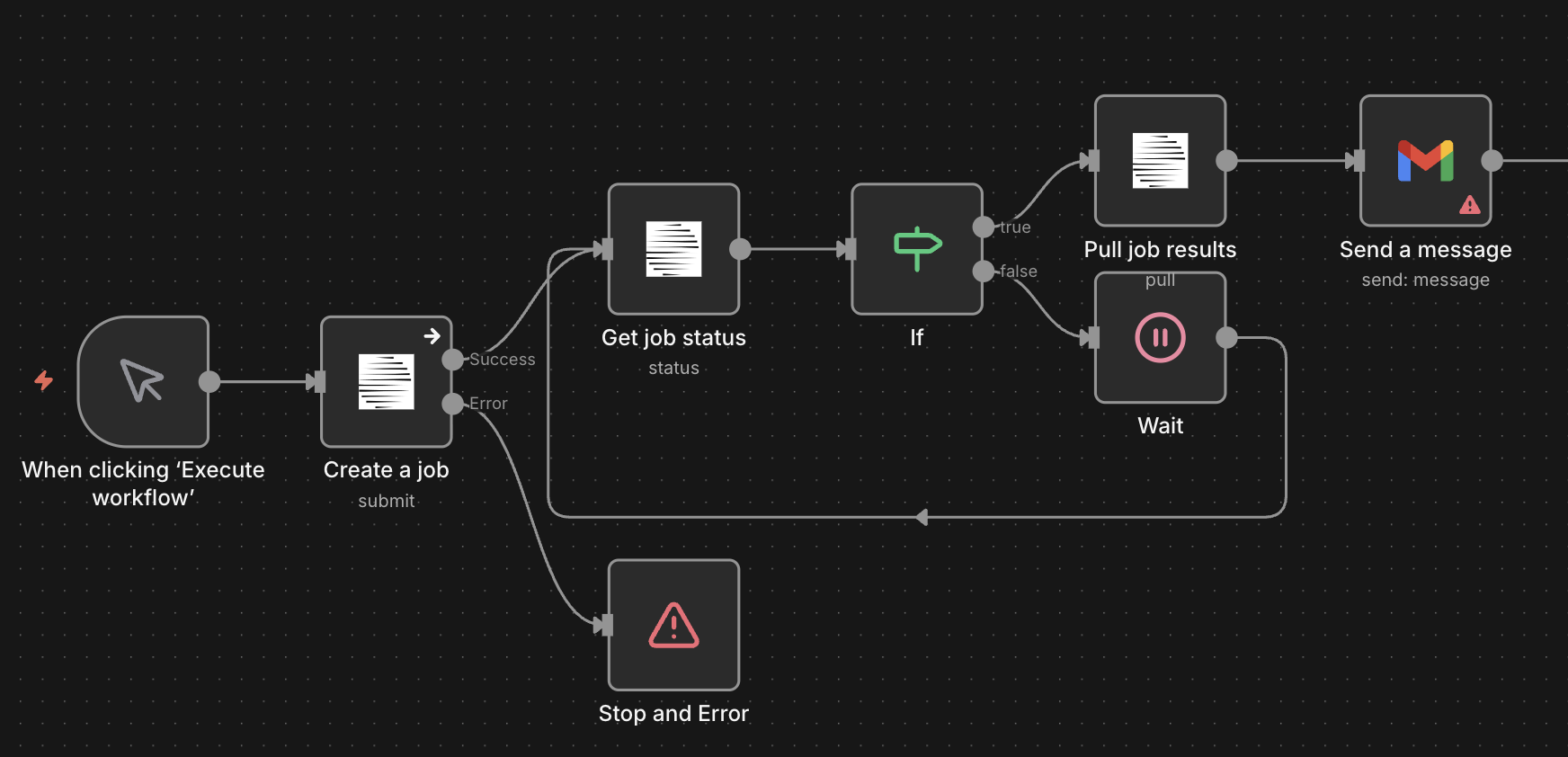 Want to skip manual setup? Import the CatchAll job demo workflow directly into your n8n instance.
```json theme={null}
{
"name": "CatchAll jobs demo workflow",
"nodes": [
{
"parameters": {
"errorMessage": "Job failed"
},
"type": "n8n-nodes-base.stopAndError",
"typeVersion": 1,
"position": [
416,
176
],
"id": "44060d35-0c46-4e4b-898c-9c66cfbc422a",
"name": "Stop and Error"
},
{
"parameters": {
"apiKey": "ZvxQafSb8CbETKn9TEPZvw6atKsvHCow",
"query": "Find all FDA drug approvals for cancer treatments"
},
"type": "n8n-nodes-newscatcher-catchall-pernode.newscatcher",
"typeVersion": 1,
"position": [
208,
0
],
"id": "d0c51fbc-9a7b-4e84-9807-2325efe58671",
"name": "Create a job",
"onError": "continueErrorOutput"
},
{
"parameters": {
"apiKey": "ZvxQafSb8CbETKn9TEPZvw6atKsvHCow",
"operation": "status",
"jobId": "={{ $json.job_id }}"
},
"type": "n8n-nodes-newscatcher-catchall-pernode.newscatcher",
"typeVersion": 1,
"position": [
416,
-96
],
"id": "2308f945-ea60-4b1b-bd36-168aea55ca29",
"name": "Get job status"
},
{
"parameters": {
"conditions": {
"options": {
"caseSensitive": true,
"leftValue": "",
"typeValidation": "loose",
"version": 2
},
"conditions": [
{
"id": "9cdb144e-77e9-4a3e-86a9-8e9a2b8140ef",
"leftValue": "={{ $json.steps[5].completed }}",
"rightValue": "",
"operator": {
"type": "boolean",
"operation": "true",
"singleValue": true
}
}
],
"combinator": "and"
},
"looseTypeValidation": true,
"options": {}
},
"type": "n8n-nodes-base.if",
"typeVersion": 2.2,
"position": [
592,
-96
],
"id": "83a12fdd-e73e-42d9-8dd6-0c14df6efb13",
"name": "If"
},
{
"parameters": {
"amount": 30
},
"type": "n8n-nodes-base.wait",
"typeVersion": 1.1,
"position": [
768,
-32
],
"id": "fa04dde4-6e85-4fdf-8893-0e43f7680359",
"name": "Wait",
"webhookId": "373e1d48-4ab6-4eaf-88ab-22c3634bb12d"
},
{
"parameters": {
"apiKey": "ZvxQafSb8CbETKn9TEPZvw6atKsvHCow",
"operation": "pull",
"jobId": "={{ $('Get job status').item.json.job_id }}"
},
"type": "n8n-nodes-newscatcher-catchall-pernode.newscatcher",
"typeVersion": 1,
"position": [
768,
-160
],
"id": "41d1db78-8be1-4566-b80e-83ef9214b096",
"name": "Pull job results"
},
{
"parameters": {},
"type": "n8n-nodes-base.manualTrigger",
"typeVersion": 1,
"position": [
32,
0
],
"id": "24320a83-eb55-4af4-8a56-7b8e7192792a",
"name": "When clicking ‘Execute workflow’"
},
{
"parameters": {
"options": {}
},
"type": "n8n-nodes-base.gmail",
"typeVersion": 2.1,
"position": [
960,
-160
],
"id": "0a6935f0-2c0f-45bf-a378-29f53abda461",
"name": "Send a message",
"webhookId": "647cd634-7a7a-4189-9395-1b0de7464ef9",
"credentials": {
"gmailOAuth2": {
"id": "XbDOkh1WENJdwCxg",
"name": "Gmail account"
}
}
}
],
"pinData": {},
"connections": {
"Create a job": {
"main": [
[
{
"node": "Get job status",
"type": "main",
"index": 0
}
],
[
{
"node": "Stop and Error",
"type": "main",
"index": 0
}
]
]
},
"Get job status": {
"main": [
[
{
"node": "If",
"type": "main",
"index": 0
}
]
]
},
"If": {
"main": [
[
{
"node": "Pull job results",
"type": "main",
"index": 0
}
],
[
{
"node": "Wait",
"type": "main",
"index": 0
}
]
]
},
"Wait": {
"main": [
[
{
"node": "Get job status",
"type": "main",
"index": 0
}
]
]
},
"Pull job results": {
"main": [
[
{
"node": "Send a message",
"type": "main",
"index": 0
}
]
]
},
"When clicking ‘Execute workflow’": {
"main": [
[
{
"node": "Create a job",
"type": "main",
"index": 0
}
]
]
},
"Send a message": {
"main": [
[]
]
}
},
"active": false,
"settings": {
"executionOrder": "v1"
},
"versionId": "e030a8b1-e231-48e4-9fdd-7877ecbb9449",
"meta": {
"templateCredsSetupCompleted": true,
"instanceId": "71c72f3793c9ca4740dce2aa3853bb30e7b900d6d3cd2bb9dc40fb153f34824f"
},
"id": "DoQr6P9M8Z3SlhRf",
"tags": []
}
```
Add a **When clicking 'Execute workflow'** trigger node to start the workflow manually.
Add a **Newscatcher CatchAll** node with these settings:
* **API Key**: Your CatchAll API key
* **Operation**: `Submit`
* **Query**: Natural language question describing what to find.
* **Context** (optional): Additional context to focus on specific aspects of your query.
* **Schema** (optional): Template string to guide record summary formatting.
This outputs a `job_id` for the next steps.
Add another **Newscatcher CatchAll** node:
* **API Key**: Your CatchAll API key
* **Operation**: `Status`
* **Job ID**: `{{ $json.job_id }}`
This returns the current processing status with a `steps` array.
Add an **If** node to check if the job is complete:
**Condition**:
```javascript theme={null}
{{ $json.steps[5].completed || $json.steps[6].completed }}
```
**Set to:** `is true`
This checks if either:
* Step 6 (status: "completed") is done > job succeeded
* Step 7 (status: "failed") is done > job failed
Connect the **False** output of the **If** node to a **Wait** node:
* **Resume**: After Time Interval
* **Wait Time**: 30 seconds
Then connect the **Wait** node back to the **Get job status** node to create a polling loop.
Connect the **True** output of the **If** node to a final **Newscatcher CatchAll** node:
* **API Key**: Your CatchAll API key
* **Operation**: `Pull`
* **Job ID**: `{{ $('Create a job').item.json.job_id }}`
This retrieves the structured records with citations.
Add the **Gmail > Send a message** node and configure it to authenticate and send job results.
Jobs typically complete in 10-15 minutes. The polling loop checks status every
30 seconds. Adjust the wait time based on your needs (30-60 seconds
recommended).
For support, contact [support@newscatcherapi.com](mailto:support@newscatcherapi.com) with your n8n version, node
package version, and error details.
## See also
* [Write effective queries](/web-search-api/how-to/write-effective-queries)
* [API Reference](/web-search-api/api-reference/jobs/create-job)
Want to skip manual setup? Import the CatchAll job demo workflow directly into your n8n instance.
```json theme={null}
{
"name": "CatchAll jobs demo workflow",
"nodes": [
{
"parameters": {
"errorMessage": "Job failed"
},
"type": "n8n-nodes-base.stopAndError",
"typeVersion": 1,
"position": [
416,
176
],
"id": "44060d35-0c46-4e4b-898c-9c66cfbc422a",
"name": "Stop and Error"
},
{
"parameters": {
"apiKey": "ZvxQafSb8CbETKn9TEPZvw6atKsvHCow",
"query": "Find all FDA drug approvals for cancer treatments"
},
"type": "n8n-nodes-newscatcher-catchall-pernode.newscatcher",
"typeVersion": 1,
"position": [
208,
0
],
"id": "d0c51fbc-9a7b-4e84-9807-2325efe58671",
"name": "Create a job",
"onError": "continueErrorOutput"
},
{
"parameters": {
"apiKey": "ZvxQafSb8CbETKn9TEPZvw6atKsvHCow",
"operation": "status",
"jobId": "={{ $json.job_id }}"
},
"type": "n8n-nodes-newscatcher-catchall-pernode.newscatcher",
"typeVersion": 1,
"position": [
416,
-96
],
"id": "2308f945-ea60-4b1b-bd36-168aea55ca29",
"name": "Get job status"
},
{
"parameters": {
"conditions": {
"options": {
"caseSensitive": true,
"leftValue": "",
"typeValidation": "loose",
"version": 2
},
"conditions": [
{
"id": "9cdb144e-77e9-4a3e-86a9-8e9a2b8140ef",
"leftValue": "={{ $json.steps[5].completed }}",
"rightValue": "",
"operator": {
"type": "boolean",
"operation": "true",
"singleValue": true
}
}
],
"combinator": "and"
},
"looseTypeValidation": true,
"options": {}
},
"type": "n8n-nodes-base.if",
"typeVersion": 2.2,
"position": [
592,
-96
],
"id": "83a12fdd-e73e-42d9-8dd6-0c14df6efb13",
"name": "If"
},
{
"parameters": {
"amount": 30
},
"type": "n8n-nodes-base.wait",
"typeVersion": 1.1,
"position": [
768,
-32
],
"id": "fa04dde4-6e85-4fdf-8893-0e43f7680359",
"name": "Wait",
"webhookId": "373e1d48-4ab6-4eaf-88ab-22c3634bb12d"
},
{
"parameters": {
"apiKey": "ZvxQafSb8CbETKn9TEPZvw6atKsvHCow",
"operation": "pull",
"jobId": "={{ $('Get job status').item.json.job_id }}"
},
"type": "n8n-nodes-newscatcher-catchall-pernode.newscatcher",
"typeVersion": 1,
"position": [
768,
-160
],
"id": "41d1db78-8be1-4566-b80e-83ef9214b096",
"name": "Pull job results"
},
{
"parameters": {},
"type": "n8n-nodes-base.manualTrigger",
"typeVersion": 1,
"position": [
32,
0
],
"id": "24320a83-eb55-4af4-8a56-7b8e7192792a",
"name": "When clicking ‘Execute workflow’"
},
{
"parameters": {
"options": {}
},
"type": "n8n-nodes-base.gmail",
"typeVersion": 2.1,
"position": [
960,
-160
],
"id": "0a6935f0-2c0f-45bf-a378-29f53abda461",
"name": "Send a message",
"webhookId": "647cd634-7a7a-4189-9395-1b0de7464ef9",
"credentials": {
"gmailOAuth2": {
"id": "XbDOkh1WENJdwCxg",
"name": "Gmail account"
}
}
}
],
"pinData": {},
"connections": {
"Create a job": {
"main": [
[
{
"node": "Get job status",
"type": "main",
"index": 0
}
],
[
{
"node": "Stop and Error",
"type": "main",
"index": 0
}
]
]
},
"Get job status": {
"main": [
[
{
"node": "If",
"type": "main",
"index": 0
}
]
]
},
"If": {
"main": [
[
{
"node": "Pull job results",
"type": "main",
"index": 0
}
],
[
{
"node": "Wait",
"type": "main",
"index": 0
}
]
]
},
"Wait": {
"main": [
[
{
"node": "Get job status",
"type": "main",
"index": 0
}
]
]
},
"Pull job results": {
"main": [
[
{
"node": "Send a message",
"type": "main",
"index": 0
}
]
]
},
"When clicking ‘Execute workflow’": {
"main": [
[
{
"node": "Create a job",
"type": "main",
"index": 0
}
]
]
},
"Send a message": {
"main": [
[]
]
}
},
"active": false,
"settings": {
"executionOrder": "v1"
},
"versionId": "e030a8b1-e231-48e4-9fdd-7877ecbb9449",
"meta": {
"templateCredsSetupCompleted": true,
"instanceId": "71c72f3793c9ca4740dce2aa3853bb30e7b900d6d3cd2bb9dc40fb153f34824f"
},
"id": "DoQr6P9M8Z3SlhRf",
"tags": []
}
```
Add a **When clicking 'Execute workflow'** trigger node to start the workflow manually.
Add a **Newscatcher CatchAll** node with these settings:
* **API Key**: Your CatchAll API key
* **Operation**: `Submit`
* **Query**: Natural language question describing what to find.
* **Context** (optional): Additional context to focus on specific aspects of your query.
* **Schema** (optional): Template string to guide record summary formatting.
This outputs a `job_id` for the next steps.
Add another **Newscatcher CatchAll** node:
* **API Key**: Your CatchAll API key
* **Operation**: `Status`
* **Job ID**: `{{ $json.job_id }}`
This returns the current processing status with a `steps` array.
Add an **If** node to check if the job is complete:
**Condition**:
```javascript theme={null}
{{ $json.steps[5].completed || $json.steps[6].completed }}
```
**Set to:** `is true`
This checks if either:
* Step 6 (status: "completed") is done > job succeeded
* Step 7 (status: "failed") is done > job failed
Connect the **False** output of the **If** node to a **Wait** node:
* **Resume**: After Time Interval
* **Wait Time**: 30 seconds
Then connect the **Wait** node back to the **Get job status** node to create a polling loop.
Connect the **True** output of the **If** node to a final **Newscatcher CatchAll** node:
* **API Key**: Your CatchAll API key
* **Operation**: `Pull`
* **Job ID**: `{{ $('Create a job').item.json.job_id }}`
This retrieves the structured records with citations.
Add the **Gmail > Send a message** node and configure it to authenticate and send job results.
Jobs typically complete in 10-15 minutes. The polling loop checks status every
30 seconds. Adjust the wait time based on your needs (30-60 seconds
recommended).
For support, contact [support@newscatcherapi.com](mailto:support@newscatcherapi.com) with your n8n version, node
package version, and error details.
## See also
* [Write effective queries](/web-search-api/how-to/write-effective-queries)
* [API Reference](/web-search-api/api-reference/jobs/create-job)